Damage Panel + No Damage (Optional)
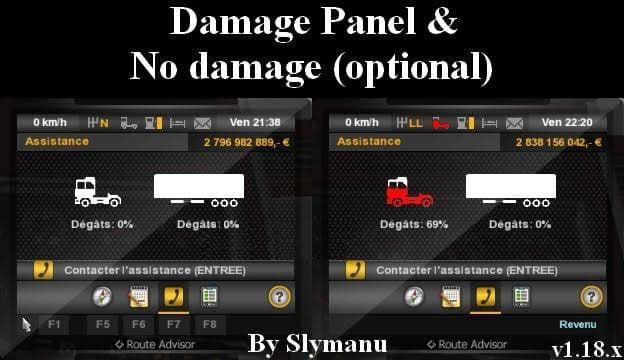
Damage Panel + No Damage (Optional) - ETS2 mods download is an ETS2 parts.
This mod offers a variation on the Damage Panel part, including an optional no damage feature. In Euro Truck Simulator 2, parts mods like this one let you customize your truck with additional accessories or functional elements. While many parts mods focus on external add-ons or visual upgrades, this mod tweaks an in-cabin interface element related to the damage system.
Parts and tuning mods generally slot into the truck customization menu, allowing players to equip their vehicles with new or altered components. Mods that affect the damage panel can change how damage is displayed or handled during gameplay, sometimes providing a way to disable damage effects entirely. This makes the driving experience either more immersive or more forgiving, depending on player preference.
When integrating this type of mod into a setup with multiple additions, load order can matter. Typically, parts mods should be placed after map and truck model mods but before any gameplay-affecting scripts for proper functionality. Compatibility is usually straightforward since it targets a specific UI element rather than core game files or physics.
Players who want to reduce frustration from frequent vehicle damage without sacrificing other aspects of simulation might find this mod useful. It suits those looking for a less punishing trucking experience or for testing routes and deliveries without interruptions from crashes. Since it's categorized under parts, it fits well alongside other visual and functional truck customizations.
Overall, if you prefer adjusting how damage information is presented in your cab and want an option to ignore damage effects altogether, this mod provides a simple solution. It's one of several ways to tailor ETS2's realism level according to personal taste.
How to install
1. Download the file(s) from the original source linked above. 2. Drop them into `Documents/Euro Truck Simulator 2/mod/`. 3. Enable in Mod Manager and restart the game.
After the mod loads, save your game inside a safe area (parking lot or service) before deciding whether to keep it. If the game refuses to load with the mod enabled, check that all required DLCs are installed and that the supported ETS2 version chips on this page include your installed game patch.
Reviews
No ratings yetNo reviews yet — be the first to rate this mod.





