DAF GTM Guardians
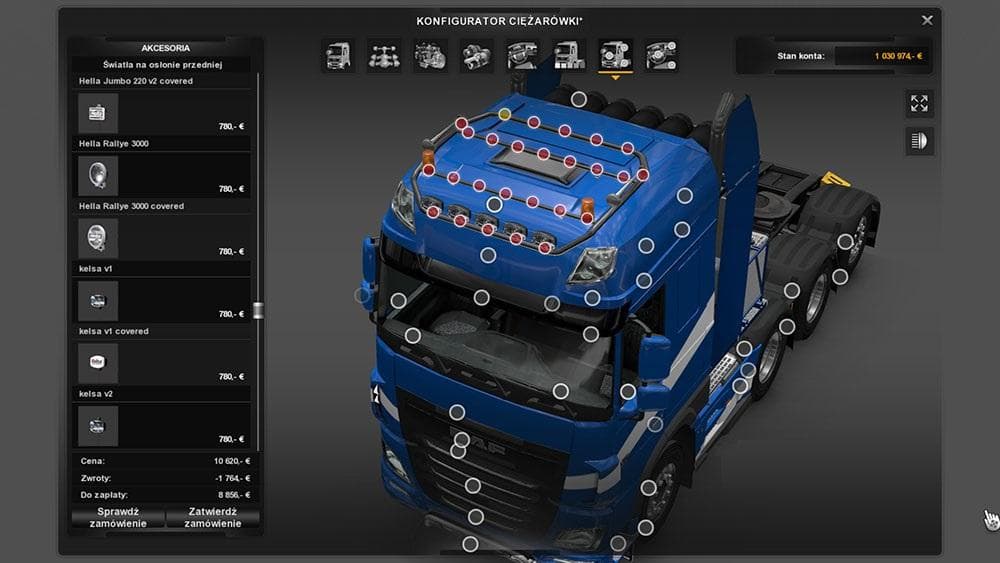
The DAF GTM Guardians mod adds standalone roofbars to SCS DAF trucks and Daf XF V3 by 50keda. Each cabin has fitted roofbars available, enhancing customization
The DAF GTM Guardians mod adds a set of standalone roofbars specifically designed for DAF trucks in Euro Truck Simulator 2. It fits both the standard SCS DAF models and the Daf XF V3 created by 50keda. These roofbars attach separately to each cabin variant, allowing for tailored customization depending on the truck model you’re using.
Parts mods like this one focus on enhancing the visual and functional appeal of your vehicle by adding accessories such as bull bars, lights, and exhausts. Roofbars are a popular choice because they add a rugged look and can also imply extra utility on your rig. Installing parts mods is generally straightforward through the truck customization menu, where you select and apply these accessories to your truck’s exterior.
When integrating parts mods into a modded setup, it's wise to check their compatibility with other tuning packs or skins you might have installed. Since this mod is standalone and targets specific DAF models, it should load without conflicts if placed correctly in the mod manager order. Typically, parts mods that alter external attachments load well alongside paint jobs or interior enhancements.
Truckers who prefer DAF vehicles will find this mod useful if they want to add some distinctive roofbar accessories to their fleet. It’s especially suited for those who enjoy tweaking every detail of their truck's appearance or aim to create a customized look that stands out on European roads.
While details like version support or file size aren't specified here, parts mods like DAF GTM Guardians usually require no special installation steps beyond activating them in your mod list. This makes it an easy addition for players focused on detailed tuning of their favorite trucks.
**standalone roofbars**
**parts mods**
**truck customization menu**
**DAF vehicles**
How to install
1. Download the file(s) from the original source linked above. 2. Drop them into `Documents/Euro Truck Simulator 2/mod/`. 3. Enable in Mod Manager and restart the game.
After the mod loads, save your game inside a safe area (parking lot or service) before deciding whether to keep it. If the game refuses to load with the mod enabled, check that all required DLCs are installed and that the supported ETS2 version chips on this page include your installed game patch.
Reviews
No ratings yetNo reviews yet — be the first to rate this mod.





