CLOSED ROAD SIGN 1.21
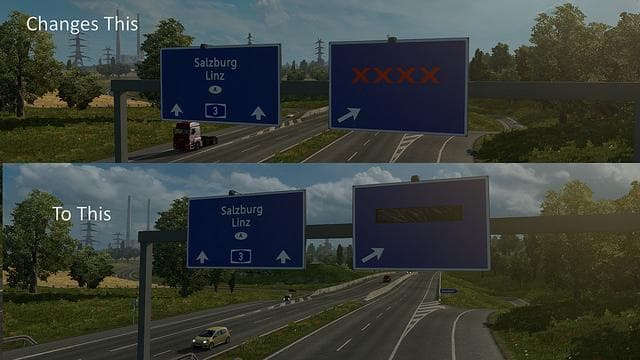
The "CLOSED ROAD SIGN 1.21" mod for ETS2 changes the closed road indicator to a black plastic sheet resembling the Scandinavia DLC. Compatible with ETS2 version
This mod titled CLOSED ROAD SIGN 1.21 alters the typical visual indicator used for closed roads in Euro Truck Simulator 2. Instead of the usual four red crosses, it replaces them with a black plastic sheet design similar to those found in the Scandinavia DLC. This change affects one of the small but noticeable environmental details that players encounter during their hauls.
In ETS2, parts mods like this one focus on adding or modifying accessories and details related to trucks and the game world. While many parts mods concentrate on truck customization options such as bull bars, lights, or interior items, this mod tweaks a road sign element seen while driving. It’s less about truck tuning and more about enhancing or altering the game's roadside visuals for variety or realism according to player preference.
When integrating mods like these into a modded setup, it's generally advisable to check load order carefully since they may conflict with other environmental or map-related mods. However, because this is a straightforward replacement of an existing graphic used for closed roads, it should work well alongside most map expansions and parts packs without causing issues. Always test after installing to be sure.
Players who enjoy fine-tuning their ETS2 experience by customizing visual elements beyond just vehicles might appreciate this subtle modification. It's suited for those who want their game environment to reflect specific regional styles or prefer alternative versions of familiar signs while exploring various countries and routes in ETS2.
Since this mod targets version 1.21 of Euro Truck Simulator 2, users running that version will find it compatible without problems. Those using newer versions might need to wait for an update or look for similar mods matching their current game build.
How to install
1. Download the file(s) from the original source linked above. 2. Drop them into `Documents/Euro Truck Simulator 2/mod/`. 3. Enable in Mod Manager and restart the game.
After the mod loads, save your game inside a safe area (parking lot or service) before deciding whether to keep it. If the game refuses to load with the mod enabled, check that all required DLCs are installed and that the supported ETS2 version chips on this page include your installed game patch.
Reviews
No ratings yetNo reviews yet — be the first to rate this mod.





