BRAZILIAN SKINS PACK FOR BUS MARCOPOLO 1800DD G6
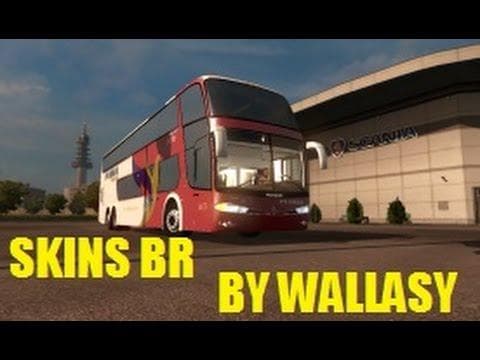
This mod is a skins pack for the Bus Marcopolo 1800DD G6 in Euro Truck Simulator 2, featuring skins like Pluma, Cometa, and Itapemirim. The credits go to Wallas
The Brazilian Skins Pack for Bus Marcopolo 1800DD G6 offers a set of paint jobs tailored specifically for this bus model in Euro Truck Simulator 2. It brings various Brazilian-themed designs to the game's paint shop, allowing players to customize their vehicles without altering the base model. Each skin represents different companies or styles commonly seen on buses in Brazil, adding regional flavor to your fleet.
Skin mods like this one don't change the physical attributes of a vehicle but repaint its exterior. They rely on the original vehicle model being present and are applied directly within the game's customization menus. This means you must own or have installed the Marcopolo 1800DD G6 bus model for these skins to work properly.
In a modded setup, skin packs fit neatly alongside other cosmetic or gameplay mods. Since they don't interfere with mechanics or physics, they're usually compatible with most other mods, provided there aren't conflicting skin files targeting the same vehicle. Load order generally isn't a big concern here, but it's wise to check if you use multiple skin mods for the same bus to avoid overwriting.
Players interested in showcasing their affinity for Brazilian transport culture will find this pack appealing. It’s especially suited for those who enjoy adding localized details and variety to their vehicles, making long hauls across Europe feel more personalized. The skins include names like Pluma, Cometa, and Pássaro Marron among others, offering some recognizable South American liveries.
Installing these skins typically involves placing them in your mod folder and enabling them through the game's mod manager before launching ETS2. Once active, they become selectable options at the paint shop when customizing your bus. As always with skins, keep backups of any original files if you modify core game content.
While specific compatibility notes or file size details aren’t available for this pack, its nature as a cosmetic add-on means it’s straightforward and low risk. Just ensure that you have the correct base bus model installed first so that these Brazilian designs can be applied without issue.
How to install
1. Download the .scs file. 2. Drop it into `Documents/Euro Truck Simulator 2/mod/`. 3. Enable in Mod Manager. 4. Apply the skin in the truck/trailer paint shop.
After the mod loads, save your game inside a safe area (parking lot or service) before deciding whether to keep it. If the game refuses to load with the mod enabled, check that all required DLCs are installed and that the supported ETS2 version chips on this page include your installed game patch.
Reviews
No ratings yetNo reviews yet — be the first to rate this mod.