Bottomgrill mudflaps mercedes actros 1.18
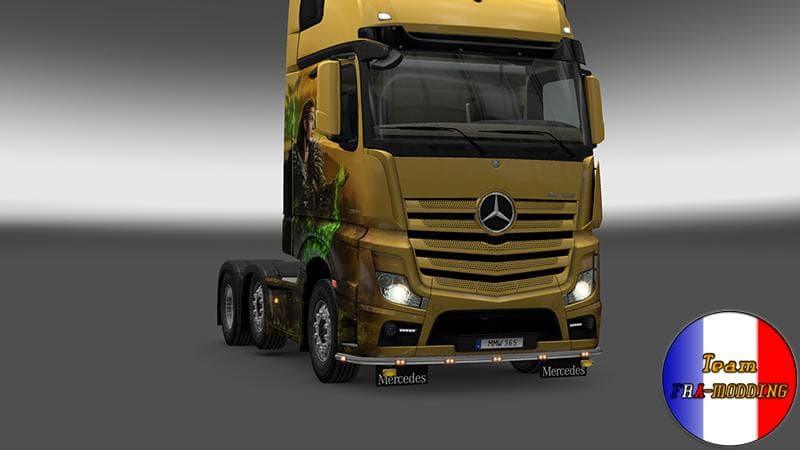
The Bottomgrill mudflaps mod is designed specifically for the Mercedes Actros in ETS2 version 1.18. It adds a set of mudflaps positioned under the truck's grill, which can be fitted through the parts customization menu. This kind of mod falls into the category of parts and tuning, where you add accessories to personalize or enhance the look of your truck.
Parts mods like these usually target particular truck models, offering additional visual details that aren't available in the base game. Installing them involves placing the mod file in your ETS2 mods folder and enabling it via the game’s mod manager. It's straightforward but always good to ensure compatibility with your current ETS2 version—in this case, both are at 1.18.
When used in a heavily modded setup, parts mods such as this one generally don't conflict with other types of mods like maps or trucks themselves but should be loaded after any other modifications affecting the same vehicle model to avoid overriding issues. Since it's specific to the Mercedes Actros, it fits neatly into setups focusing on that brand or style.
This mod is ideal for players who enjoy customizing their trucks beyond just paint jobs and decals. If you appreciate subtle touches that add character and detail to your vehicle, adding bottom grill mudflaps can make your Actros stand out while driving across European roads or any of the supported regions in ETS2.
How to install
1. Download the file(s) from the original source linked above. 2. Drop them into `Documents/Euro Truck Simulator 2/mod/`. 3. Enable in Mod Manager and restart the game.
After the mod loads, save your game inside a safe area (parking lot or service) before deciding whether to keep it. If the game refuses to load with the mod enabled, check that all required DLCs are installed and that the supported ETS2 version chips on this page include your installed game patch.
Reviews
No ratings yetNo reviews yet — be the first to rate this mod.





