BEACON PACK BY COBRABLUE6 V1.2
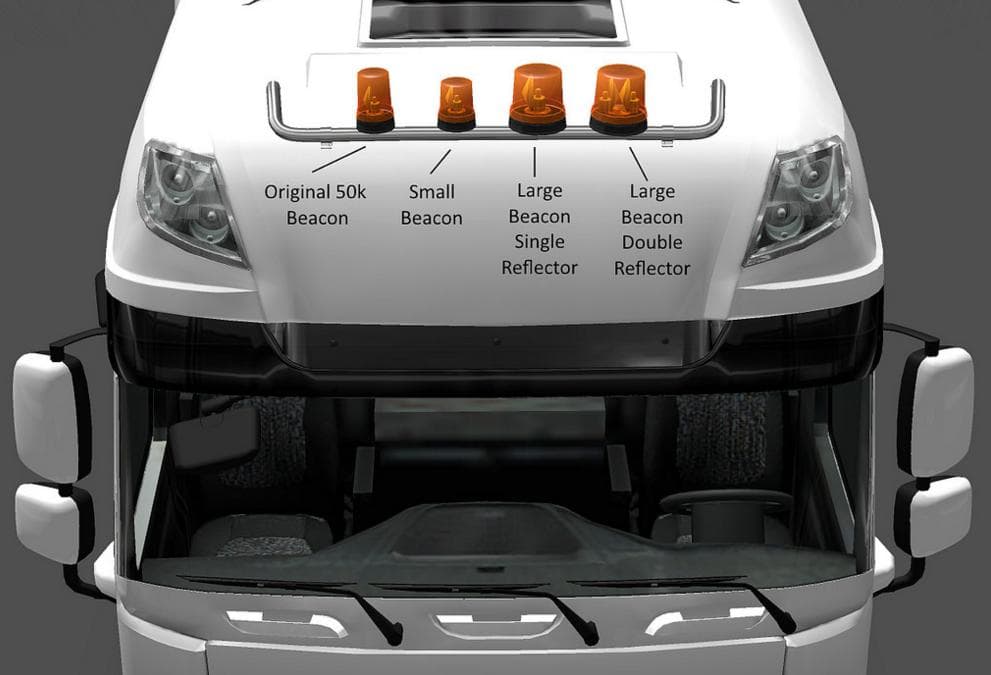
The BEACON PACK BY COBRABLUE6 is a parts mod for ETS2 version 1.2 and 1.1. Version 1.2 includes updates for compatibility with MADster's MAN TGA v1.1. Created b
The BEACON PACK BY COBRABLUE6 V1.2 is a parts mod designed for Euro Truck Simulator 2 that adds additional beacon lights to trucks. Parts mods like this one expand the customization options available in the truck configuration menu by offering accessories such as lights, mirrors, or bull bars. This particular pack updates compatibility with certain truck models, including MADster's MAN TGA, ensuring it fits well within a modded setup focused on enhancing truck appearance and functionality.
In ETS2, beacon lights serve both aesthetic and practical roles, often used by players who want their trucks to stand out or simulate work vehicles more realistically. Installing packs like this usually involves placing the file in the mod folder and enabling it through the game’s mod manager. Since it updates for specific models, it’s worth checking for any conflicts if you have other mods altering the same parts or trucks.
When using parts mods, load order can affect how different accessories appear on your vehicle. It’s generally advised to place accessory packs like beacon light sets after major truck or tuning mods to avoid overwriting issues. This helps maintain all customizations without losing any features from either mod.
This beacon pack suits players who enjoy detailed truck customization and want extra lighting options to personalize their rigs. It’s particularly useful for those running a heavily modded fleet where visual details contribute to immersion or roleplaying scenarios involving service vehicles.
Given its update history supporting versions 1.1 and 1.2 of ETS2, this mod fits older game versions but might require checking compatibility with newer releases or other extensive tuning mods.
How to install
1. Download the file(s) from the original source linked above. 2. Drop them into `Documents/Euro Truck Simulator 2/mod/`. 3. Enable in Mod Manager and restart the game.
After the mod loads, save your game inside a safe area (parking lot or service) before deciding whether to keep it. If the game refuses to load with the mod enabled, check that all required DLCs are installed and that the supported ETS2 version chips on this page include your installed game patch.
Reviews
No ratings yetNo reviews yet — be the first to rate this mod.





