Balkan Cabin Accessory Pack
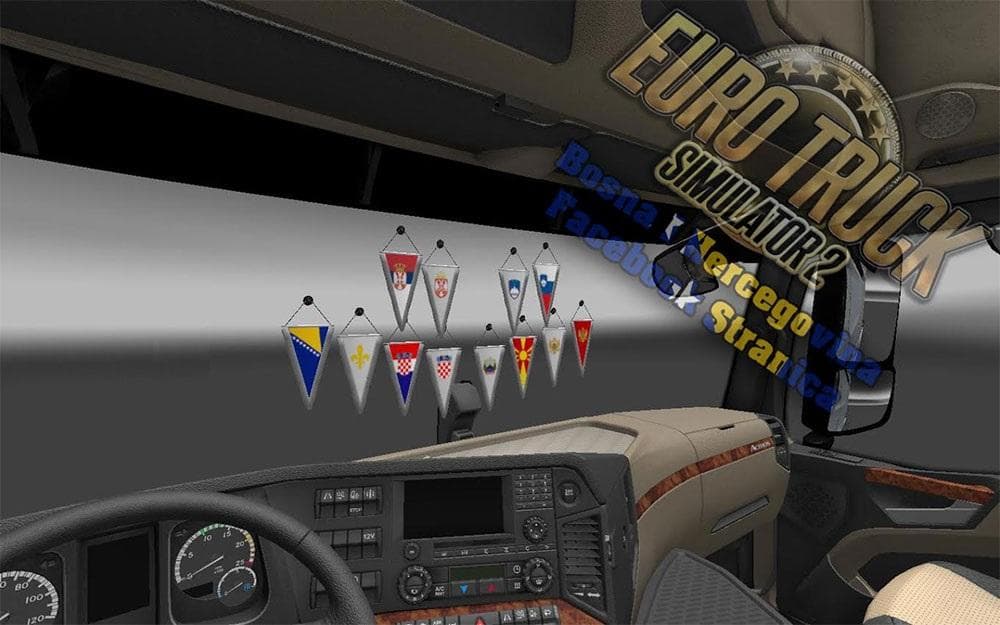
Balkan Cabin Accessory Pack is an ETS2 parts.
The Balkan Cabin Accessory Pack adds a collection of regional decorations to your truck’s interior, focusing on items like pennants, scarves, and cups representing countries such as Bosnia & Herzegovina, Serbia, Croatia, Montenegro, Slovenia, and Macedonia. This kind of mod enhances the visual customization options in Euro Truck Simulator 2 by letting you personalize your cabin with culturally specific accessories.
Parts mods like this one usually appear in the truck customization menu under accessories or cabin items. They allow you to add various aesthetic touches that reflect personal or regional tastes. Since this pack targets a particular geographic area—the Balkans—it’s especially suited for players who want their trucks to showcase that part of Europe.
When adding parts mods to your game, it’s helpful to consider load order and compatibility. Accessories generally don’t conflict much with other mods since they modify visual elements inside the cabin. However, it’s always good practice to load them after any truck-specific tuning mods to ensure they display correctly.
This pack fits well into a modded setup where you’re aiming for realism or thematic consistency based on location. For example, if you use map mods covering Balkan countries or drive routes around that region, these accessories complement the experience by adding local flavor inside the truck.
Drivers who enjoy customizing their rigs beyond performance upgrades will find this mod interesting. It adds a subtle but immersive detail layer that can make long hauls feel more connected to the areas you’re passing through.
Overall, this accessory pack is for players looking to add authentic touches from the Balkans inside their trucks. It’s not about gameplay changes but about enriching your driving environment with familiar symbols from Southeastern Europe.
How to install
1. Download the file(s) from the original source linked above. 2. Drop them into `Documents/Euro Truck Simulator 2/mod/`. 3. Enable in Mod Manager and restart the game.
After the mod loads, save your game inside a safe area (parking lot or service) before deciding whether to keep it. If the game refuses to load with the mod enabled, check that all required DLCs are installed and that the supported ETS2 version chips on this page include your installed game patch.
Reviews
No ratings yetNo reviews yet — be the first to rate this mod.





