Animated LED Window Eyes v1.60
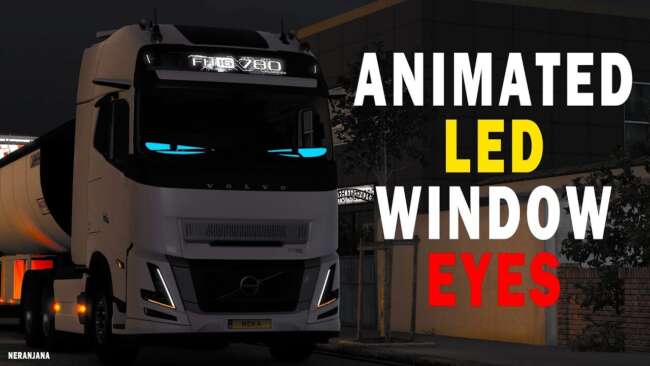
Animated LED Window Eyes mod version 1.60 by ets2mods adds colorful LED window eyes to most SCS trucks in Euro Truck Simulator 2. Available colors include white
Animated LED Window Eyes v1.60 adds a set of animated LED light accessories designed for the windows of most SCS trucks in Euro Truck Simulator 2. This mod offers several color options including white, green, blue, and red, giving players some choice in customizing their truck's look. While many SCS trucks are supported, a few are excluded due to fitment problems, which is common with parts mods that need precise alignment.
Parts mods like this one are typically installed through the truck customization menu where you can add various tuning elements such as lights, bull bars, mirrors, or exhausts. These accessories usually target specific truck models or brands to ensure proper fit and function within the game’s environment. Animated LED Window Eyes fall into this category by enhancing the visual appeal of your cab without affecting gameplay mechanics.
When integrating parts mods into your setup, it's important to consider load order to avoid conflicts especially if you have multiple mods altering the same component on a truck. Since this mod supports ETS2 version 1.60, compatibility with other mods for this version should be smooth as long as there aren’t overlapping textures or scripts. Users might want to check if their preferred truck is supported before installing.
This mod suits players who enjoy personalizing their vehicles beyond standard options and prefer subtle lighting effects that add character to their rigs during night drives or when parked. It's particularly useful for those who spend time cruising around regions like Germany or France where detailed truck visuals enhance immersion.
Overall, Animated LED Window Eyes offers a straightforward way to brighten up your cab windows with moving LED effects in different colors. It’s a simple addition that blends well into modded setups focused on visual upgrades and fits nicely alongside other parts mods targeting SCS trucks.
How to install
1. Download the file(s) from the original source linked above. 2. Drop them into `Documents/Euro Truck Simulator 2/mod/`. 3. Enable in Mod Manager and restart the game.
After the mod loads, save your game inside a safe area (parking lot or service) before deciding whether to keep it. If the game refuses to load with the mod enabled, check that all required DLCs are installed and that the supported ETS2 version chips on this page include your installed game patch.
Reviews
No ratings yetNo reviews yet — be the first to rate this mod.





