Allround lightbox
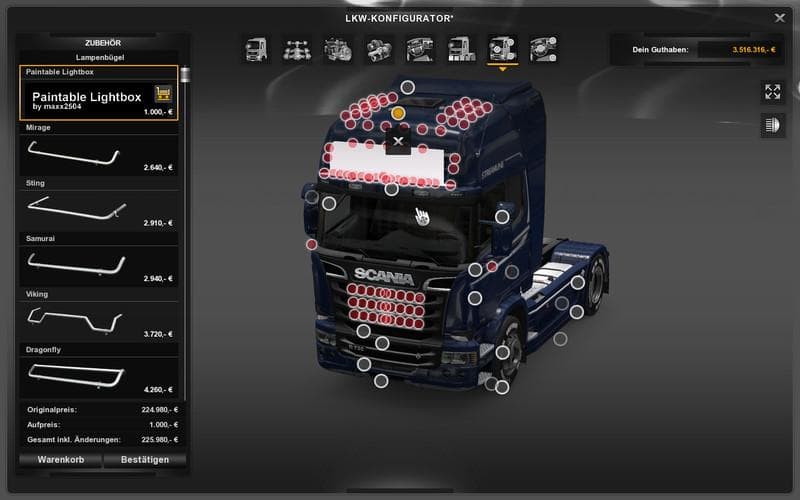
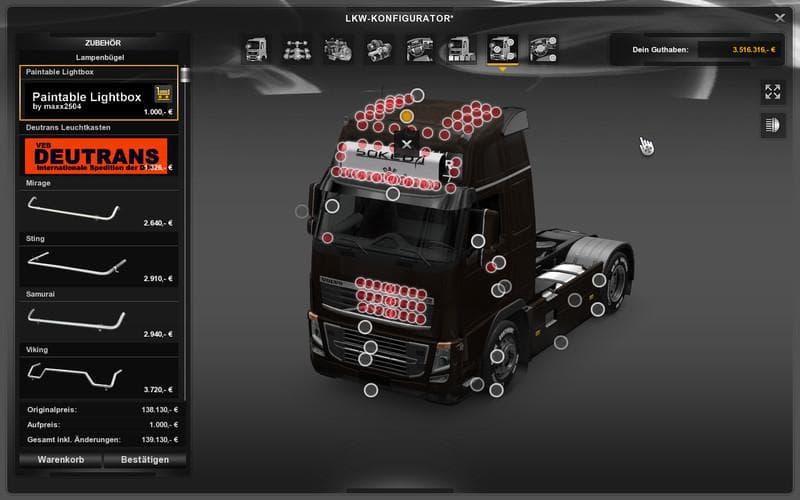
The "Allround lightbox - ETS2 mods download" is a parts mod version 1.0 created by Euro truck simulator 2. It offers a lightbox Ffast for all SCS models, includ
The Allround lightbox mod adds a versatile lighting accessory designed to fit various SCS truck models, including the RJL Scania and Scania T-Liner. This part expands the customization options available in the truck tuning menu, allowing players to equip their vehicles with additional lighting that can improve visibility and style on the road.
Parts mods like this one focus on enhancing trucks by adding extra components such as bull bars, exhausts, mirrors, and lights. They typically target specific brands or models to ensure compatibility and realism. The Allround lightbox is no exception, being tailored for popular Scania models which are common choices among ETS2 players.
Integrating a parts mod like this into a modded setup generally requires attention to load order, especially if multiple tuning mods affect the same truck or parts category. Placing it after base game files but before larger overhaul mods can help avoid conflicts. It's also useful to check compatibility when combining with other visual or performance upgrades for these Scania trucks.
This mod suits players who enjoy personalizing their rigs beyond factory settings and want a unified lighting solution across different Scania versions. It fits well with drivers who often switch between these models but prefer consistent accessory options without installing separate mods for each one.
Since it supports ETS2 version 1.0 and focuses on aesthetic improvements rather than gameplay changes, it's straightforward to add without worrying about major incompatibilities or complex installation steps. Skins and parts mods like this typically load via the game's mod manager once placed in the correct folder.
Overall, anyone looking to enhance their Scania fleet's appearance with extra lighting accessories should find this mod a handy addition. It helps maintain visual cohesion across multiple truck types while expanding tuning possibilities within ETS2.
How to install
1. Download the file(s) from the original source linked above. 2. Drop them into `Documents/Euro Truck Simulator 2/mod/`. 3. Enable in Mod Manager and restart the game.
After the mod loads, save your game inside a safe area (parking lot or service) before deciding whether to keep it. If the game refuses to load with the mod enabled, check that all required DLCs are installed and that the supported ETS2 version chips on this page include your installed game patch.
Reviews
No ratings yetNo reviews yet — be the first to rate this mod.





