ADO / COCACOLA CHRISTMAS BUS (SKIN)
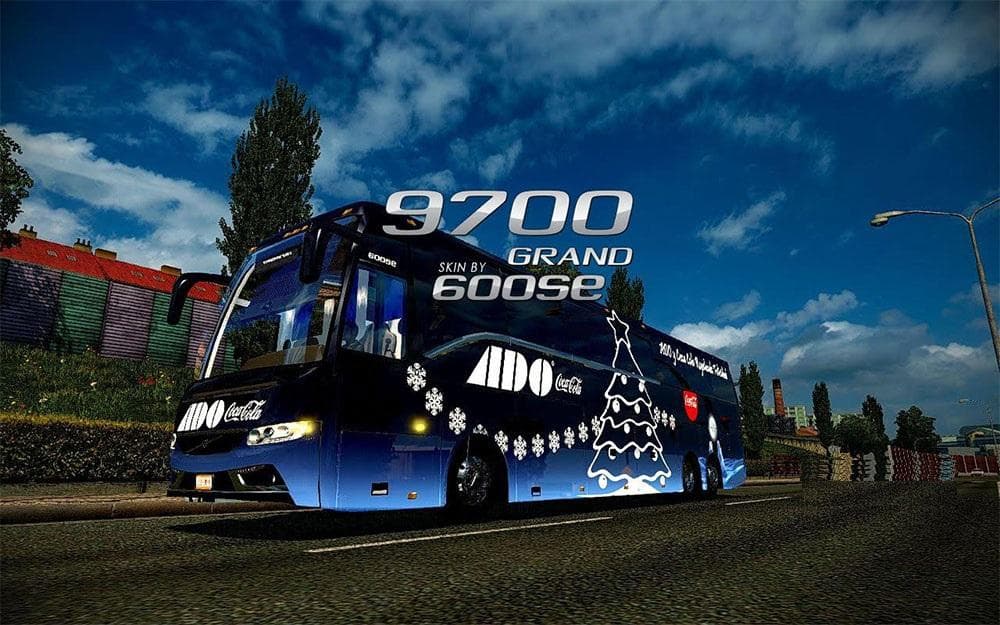
This skin mod for ETS2 features a festive ADO / COCACOLA Christmas bus design, tested on the Volvo Grand MaGo Edition. Installation instructions include unzippi
The ADO / COCACOLA CHRISTMAS BUS skin is a repaint mod designed for Euro Truck Simulator 2. It applies a festive Coca-Cola-themed design to an existing bus model, giving it a seasonal look without altering the vehicle's structure or performance. Such skins are generally installed via the in-game paint shop and rely on the base model they were created for, which means this mod works as a visual enhancement rather than adding new gameplay elements.
Skin mods like this one focus solely on changing the appearance of trucks, trailers, or cabins by applying new textures or designs. They don't affect driving physics or game mechanics but can add variety and personalization to your fleet. Since they're applied through the paint shop, you can swap them out easily depending on your mood or thematic preferences for your ETS2 sessions.
When integrating this skin into a modded setup, it's important to place it in your mods folder within the game's documents directory. Load order usually doesn't pose issues for skins unless you use multiple mods altering the same vehicle's appearance; in those cases, the last loaded skin will be visible. Compatibility depends on matching the skin with its intended base model, so make sure you have that specific bus available in your game.
Players who enjoy customizing their trucks with holiday themes or brand-inspired designs will find this mod appealing. It fits well for those looking to add a bit of seasonal spirit to their virtual trucking experience without changing core gameplay features.
This type of mod is straightforward and light, making it suitable for players running several other cosmetic mods alongside functional ones like AI traffic or map expansions. It's a simple way to refresh the look of your vehicles during special occasions like Christmas.
How to install
1. Download the .scs file. 2. Drop it into `Documents/Euro Truck Simulator 2/mod/`. 3. Enable in Mod Manager. 4. Apply the skin in the truck/trailer paint shop.
After the mod loads, save your game inside a safe area (parking lot or service) before deciding whether to keep it. If the game refuses to load with the mod enabled, check that all required DLCs are installed and that the supported ETS2 version chips on this page include your installed game patch.
Reviews
No ratings yetNo reviews yet — be the first to rate this mod.