ABASSTREPPAS WHEELPACK - CHROME EDIT 1.2.1
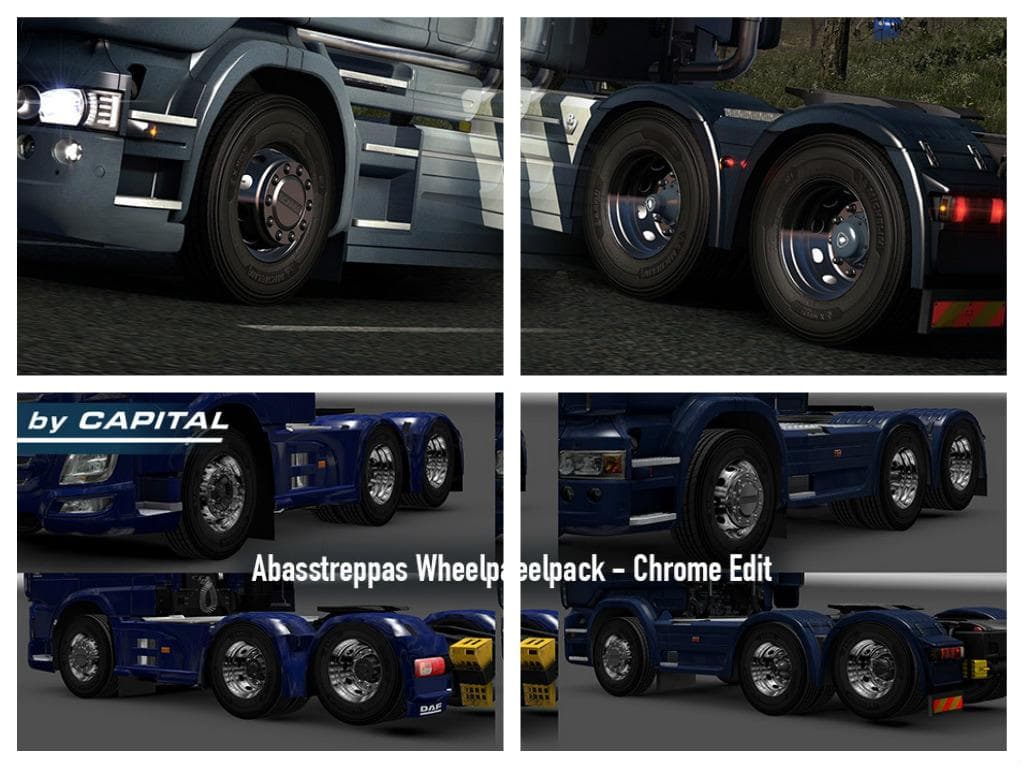
ABASSTREPPAS WHEELPACK - CHROME EDIT 1.2.1 is a parts mod for ETS2 versions 1.2 and 1.0. It improves the compatibility of the wheels with 50keda's Alcoa rims. C
The ABASSTREPPAS WHEELPACK - CHROME EDIT 1.2.1 is a parts mod focused on enhancing the appearance of your truck's wheels in Euro Truck Simulator 2. This particular wheelpack offers chrome finishes designed to complement existing rim styles, aiming to create a more polished look for your vehicle. The update from version 1.0 to 1.2 improved the wheels' compatibility with 50keda's Alcoa rims, ensuring better visual integration.
Parts mods like this one are installed through the truck customization menu and typically add or modify accessories such as wheels, bull bars, or mirrors. Since this mod targets wheels specifically, it fits neatly into any setup where you want to upgrade or change your truck’s rims without affecting other parts of your build.
When using parts mods, especially those that alter wheels or rims, it’s wise to consider load order if you have multiple wheel packs installed. Generally, ETS2 loads mods from top to bottom in the mod manager, so placing this wheelpack after others can help prevent conflicts or overrides. It’s also beneficial when pairing with other tuning mods that focus on different parts of the truck.
This wheelpack supports older versions of ETS2 (1.0 and 1.2), which means it's suitable for players running these game versions or those who prefer a vintage setup in their mod collections. Compatibility with newer versions isn’t mentioned, so users should be cautious if they plan to upgrade ETS2 beyond those supported versions.
Players who enjoy personalizing their trucks down to specific details like wheels will find this mod useful. It’s especially appealing for those who already use other visual enhancement mods and want their chrome rims to match well with Alcoa-style wheels found in popular mod packs.
How to install
1. Download the file(s) from the original source linked above. 2. Drop them into `Documents/Euro Truck Simulator 2/mod/`. 3. Enable in Mod Manager and restart the game.
After the mod loads, save your game inside a safe area (parking lot or service) before deciding whether to keep it. If the game refuses to load with the mod enabled, check that all required DLCs are installed and that the supported ETS2 version chips on this page include your installed game patch.
Reviews
No ratings yetNo reviews yet — be the first to rate this mod.





