Abasstreppas LightFix Kit v1.60
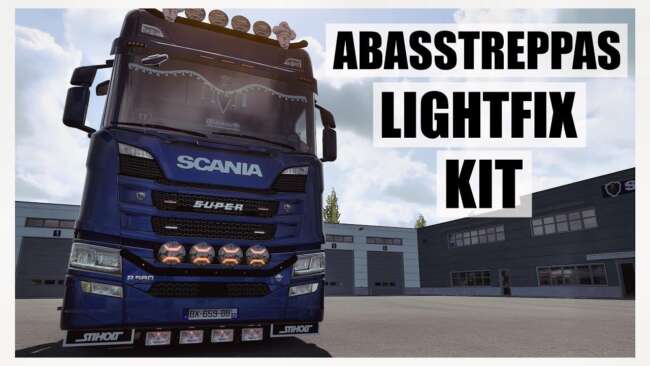
Abasstreppas LightFix Kit is an ETS2 parts. Listed compatible with ETS2 1.60.
The Abasstreppas LightFix Kit v1.60 is a parts mod designed for Euro Truck Simulator 2 version 1.60. It adds various light bars and beacons to your truck, allowing for additional customization options in the vehicle tuning menu. These accessories come with multiple finish types, including polished stainless steel, matte black, shiny black, as well as matte and shiny paint that matches the truck's color.
Parts mods like this one enhance your truck's appearance by adding practical or decorative accessories. Light bars and beacons are typical additions that can improve visibility or just make your rig stand out on the road. This kind of mod usually targets a range of trucks rather than a single model, offering flexibility in customization.
When integrating parts mods such as this light fix kit into a heavily modded setup, it's important to consider load order to prevent conflicts with other accessory packs or tuning mods. Generally, parts mods should load after map and core game patches but before skin packs. Since this mod is specifically made for ETS2 version 1.60, ensure compatibility if you are using other mods built for different game versions.
Drivers who enjoy tweaking their trucks beyond stock configurations will find this mod useful. Whether you're aiming for a more realistic look with functional beacons or just want to personalize your vehicle’s exterior with different bar finishes, these additions help fine-tune your truck’s style.
This mod fits well within European trucking scenarios featured in ETS2, complementing gameplay across various regions such as Germany, France, and the United Kingdom where detailed truck customization is often appreciated by players.
Keep in mind that since it’s a parts-focused mod by ets2mods, it won't alter gameplay mechanics but focuses solely on visual enhancement through accessories installed via the truck customization interface.
How to install
1. Download the file(s) from the original source linked above. 2. Drop them into `Documents/Euro Truck Simulator 2/mod/`. 3. Enable in Mod Manager and restart the game.
After the mod loads, save your game inside a safe area (parking lot or service) before deciding whether to keep it. If the game refuses to load with the mod enabled, check that all required DLCs are installed and that the supported ETS2 version chips on this page include your installed game patch.
Reviews
No ratings yetNo reviews yet — be the first to rate this mod.





