50k Alcoa MAN Wheels Pack
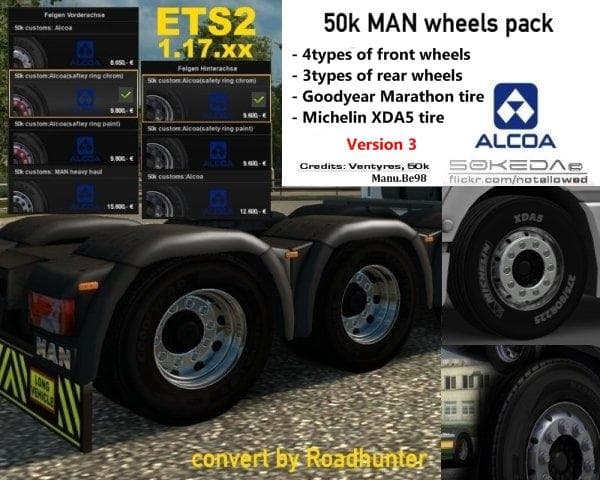
The 50k Alcoa MAN Wheels Pack is a parts mod for Euro Truck Simulator 2, version 3.0. It was last updated on April 22, 2015, with unknown file size and supporte
The 50k Alcoa MAN Wheels Pack brings a specific set of wheels to Euro Truck Simulator 2, designed for MAN trucks. This mod falls under the parts category, which generally means it adds new accessories or customization options you can fit on your vehicle through the truck customization menu. Wheels like these often aim to give your rig a fresh look or a different style that matches certain truck brands better.
In ETS2, parts mods such as wheel packs let players tailor their trucks beyond the stock options. They typically include variations in design, size, or finish. This particular pack focuses on Alcoa wheels, known in real life for their durability and distinctive appearance, which might appeal to those looking to add realism or variety to their MAN fleet.
When setting up mods, parts like these usually slot into the customization section without conflicting much with other modifications. However, it's wise to keep an eye on load order if you run multiple parts mods targeting similar components to avoid overlap or issues. Since details about compatibility aren't specified here, users should test for any conflicts especially if they use extensive mod collections.
This wheels pack would interest players who prefer customizing their MAN trucks with authentic-looking equipment and want to diversify their options beyond default game content. It's especially relevant for those who enjoy tuning their vehicles carefully and adding touches that reflect real-world trucking gear.
Overall, this mod suits ETS2 drivers aiming for enhanced personalization in their garage setup. It complements other brand-specific parts and helps create a unique look without altering core gameplay mechanics.
How to install
1. Download the file(s) from the original source linked above. 2. Drop them into `Documents/Euro Truck Simulator 2/mod/`. 3. Enable in Mod Manager and restart the game.
After the mod loads, save your game inside a safe area (parking lot or service) before deciding whether to keep it. If the game refuses to load with the mod enabled, check that all required DLCs are installed and that the supported ETS2 version chips on this page include your installed game patch.
Reviews
No ratings yetNo reviews yet — be the first to rate this mod.





