Wolf’s Pack v1
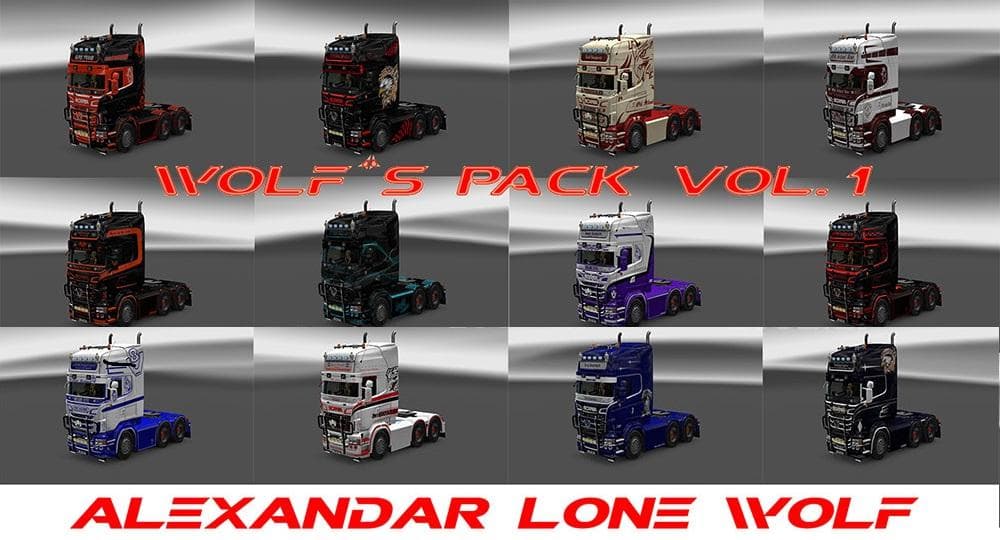
Wolf’s Pack v1 is an ETS2 skins.
Wolf’s Pack v1 is a skin mod for Euro Truck Simulator 2 that offers a set of custom paint jobs primarily designed for Scania RJL trucks. It serves as a tribute to fans of this particular truck model, featuring a collection of 14 distinct skins with themes like Old School Boy and Borealis. These skins don't alter the truck's shape or mechanics but refresh its appearance, allowing drivers to personalize their vehicles without changing the base model.
Skin mods like Wolf’s Pack v1 work by repainting existing trucks or trailers in the game. They are applied through the paint shop menu and rely on the specific vehicle they were created for, which means compatibility depends on having the correct base truck model installed. Such mods are popular because they add visual variety without affecting gameplay or performance.
When integrating skin mods into a modded ETS2 setup, it’s important to consider load order to avoid conflicts, especially if other skins or model-altering mods are in use. Typically, skin packs should be placed after any vehicle model mods but before gameplay-affecting modifications. This ensures that your chosen paint jobs display correctly without being overridden.
Players who enjoy customizing their fleet's look will find Wolf’s Pack v1 appealing, particularly those who prefer Scania RJL trucks. It suits users who want multiple skin options bundled together, making it easier to switch styles depending on mood or convoy themes. Because it's purely cosmetic, it fits well alongside various map expansions and trucking enhancements without interference.
This kind of mod is straightforward to install by placing its files in your mod folder and enabling it via the game’s mod manager. Since no functional changes are involved, compatibility issues tend to be minimal compared to other mod types. Still, always check for updates or user feedback regarding ETS2 version support if you’re running a newer release.
How to install
1. Download the .scs file. 2. Drop it into `Documents/Euro Truck Simulator 2/mod/`. 3. Enable in Mod Manager. 4. Apply the skin in the truck/trailer paint shop.
After the mod loads, save your game inside a safe area (parking lot or service) before deciding whether to keep it. If the game refuses to load with the mod enabled, check that all required DLCs are installed and that the supported ETS2 version chips on this page include your installed game patch.
Reviews
No ratings yetNo reviews yet — be the first to rate this mod.





