WESTER ENERGY TRAILER SKIN
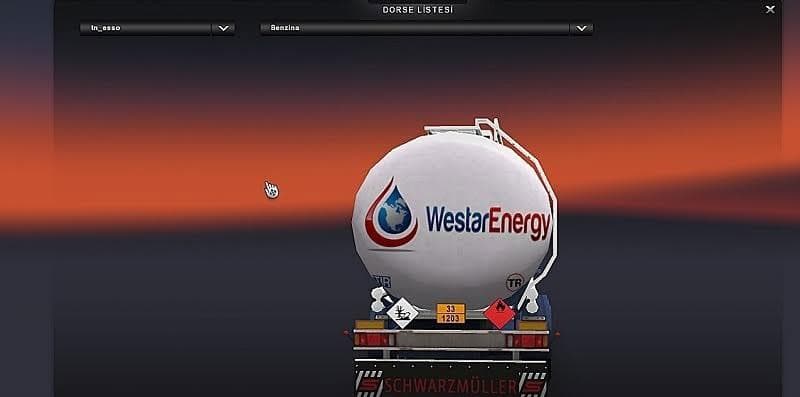
The WESTER ENERGY TRAILER SKIN is a repaint mod designed for trailers in Euro Truck Simulator 2. Instead of altering the trailer's model or function, it changes the visual appearance by applying a new texture, giving your trailer a distinct look themed around energy transport. Skin mods like this one are typically applied through the paint shop within the game and rely on the specific base trailer they were created for.
In ETS2, skin mods provide an easy way to customize your vehicles without affecting gameplay mechanics. They allow players to add variety and personality to their fleets by refreshing old models with new liveries. Because this mod is compatible with ETS2 versions 1.18 and 1.19, it fits well into setups running these or later compatible versions.
When using skin mods such as the WESTER ENERGY TRAILER SKIN alongside other modifications, it's important to remember that skins generally don't conflict with gameplay-affecting mods but should be loaded after any model-altering mods that affect trailers. This helps ensure the repaint displays correctly without issues.
This particular skin suits players who want to diversify their trailer collection visually or those who enjoy roleplaying scenarios involving energy cargo transport. It's also useful for anyone looking to complement themed convoy runs or enhance screenshots with varied trailer appearances.
Since the creator is unknown and details like file size aren't specified, users should verify compatibility themselves before installing and keep backups of original files. As with all skins, it doesn't change how the trailer handles or performs—only its look.
Overall, if you're running ETS2 around versions 1.18 to 1.19 and want to add some visual variety to your trailers without adding complexity, this skin can slot in easily alongside your existing mods.
How to install
1. Download the .scs file. 2. Drop it into `Documents/Euro Truck Simulator 2/mod/`. 3. Enable in Mod Manager. 4. Apply the skin in the truck/trailer paint shop.
After the mod loads, save your game inside a safe area (parking lot or service) before deciding whether to keep it. If the game refuses to load with the mod enabled, check that all required DLCs are installed and that the supported ETS2 version chips on this page include your installed game patch.
Reviews
No ratings yetNo reviews yet — be the first to rate this mod.





