Weather mod by Piva for 1.22
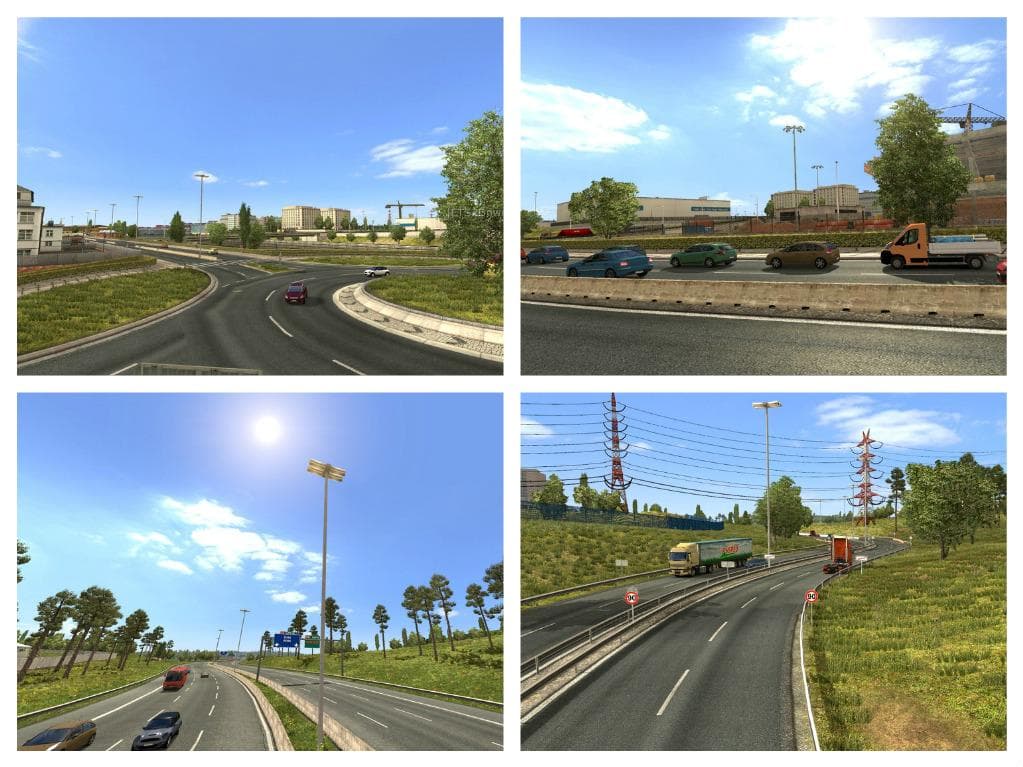
Weather mod by Piva for 1.22 is an ETS2 unknown. Listed compatible with ETS2 1.22.
The Weather mod by Piva for 1.22 focuses on adjusting weather visuals and ambiance in Euro Truck Simulator 2, particularly by modifying skyboxes and tweaking color schemes to create more varied atmospheric conditions. While it’s categorized under sounds, this mod blends audio and visual elements to enhance the overall environmental feel during different weather scenarios.
Sound mods in ETS2 typically replace or enhance engine noises, horns, or ambient sounds like rain or wind. They usually need to be placed higher in the load order than truck-specific sound mods to work properly. Although this mod alters weather visuals as well, its placement in the load order should still consider other sound mods you might have installed.
For players running a modded setup with multiple audio or weather-related modifications, ensuring that this mod loads above others that affect truck sounds is recommended. This helps prevent conflicts and allows its changes to take effect without being overwritten by other mods targeting similar files.
Those who enjoy a more immersive driving experience with dynamic and visually distinct weather conditions will find this mod appealing. It’s suited for anyone wanting subtle shifts in sky colors and cloud formations during different weather types without completely overhauling the game's base atmosphere.
Overall, the Weather mod by Piva adds a touch of variety to ETS2's environment by combining sound adjustments with modified skybox appearances. It fits nicely into setups where players want their game world to feel a bit more alive and responsive to changing weather patterns.
How to install
1. Download the .scs file. 2. Drop it into `Documents/Euro Truck Simulator 2/mod/`. 3. Enable in Mod Manager. Sound mods usually need to load **above** truck mods in load order. 4. Restart the game so the audio engine picks up new samples.
After the mod loads, save your game inside a safe area (parking lot or service) before deciding whether to keep it. If the game refuses to load with the mod enabled, check that all required DLCs are installed and that the supported ETS2 version chips on this page include your installed game patch.
Reviews
No ratings yetNo reviews yet — be the first to rate this mod.





