W. DE ZEEUW TRANSPORT DAF XF TRUCK
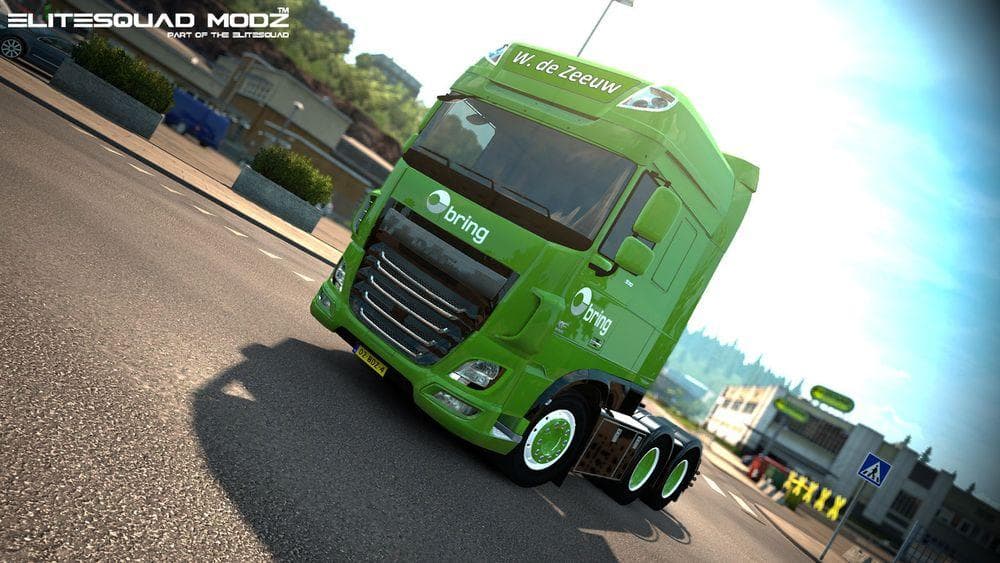
W. DE ZEEUW TRANSPORT DAF XF TRUCK is an ETS2 skins.
The W. DE ZEEUW TRANSPORT DAF XF TRUCK mod brings a fresh paint job to the DAF XF Euro 6 truck model, showcasing the livery of a Dutch transport company. Instead of altering the truck’s shape or adding new parts, this skin replaces the truck’s exterior design with detailed graphics that reflect W. de Zeeuw Transport's branding. Skins like this one are generally installed through the paint shop in ETS2 and rely on having the base vehicle available in your game.
Skin mods such as this one don't change gameplay mechanics but add visual variety to your fleet. They can blend well into a modded setup where players often use multiple skins to differentiate trucks or create themed convoys. Since these mods only repaint existing models, they usually don’t conflict with other types of mods unless multiple skins try to overwrite each other for the same truck model.
For load order, skin mods typically need to be placed below any model-changing mods but above general map or gameplay tweaks to ensure their textures appear correctly. Compatibility tends to be straightforward as long as you're using the matching base truck version. It helps to check if your ETS2 version supports the skin's graphic quality, especially when it features high-resolution textures like 4K.
This skin appeals mainly to players who enjoy customizing their vehicles with authentic liveries from European transport companies, particularly those interested in Dutch trucking brands. If you prefer realism and want your DAF XF Euro 6 trucks to stand out on roads across Europe, this mod fits naturally into that style of play.
Overall, it’s a simple way to refresh your visual experience without touching gameplay elements. The focus remains on aesthetics and immersion for those who appreciate detailed liveries representing real-world companies from the Netherlands.
How to install
1. Download the .scs file. 2. Drop it into `Documents/Euro Truck Simulator 2/mod/`. 3. Enable in Mod Manager. 4. Apply the skin in the truck/trailer paint shop.
After the mod loads, save your game inside a safe area (parking lot or service) before deciding whether to keep it. If the game refuses to load with the mod enabled, check that all required DLCs are installed and that the supported ETS2 version chips on this page include your installed game patch.
Reviews
No ratings yetNo reviews yet — be the first to rate this mod.





