VW HIPPIE VAN FOR AI TRAFFIC V2
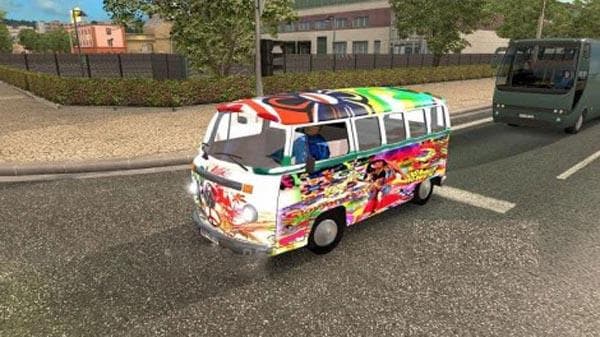
The VW Hippie Van for AI Traffic V2 mod adds a "Hippie" van to the traffic in Euro Truck Simulator 2. The mod includes manifest files and credits Fabricen, Dark
This mod introduces a distinctive "Hippie" van to the AI traffic in Euro Truck Simulator 2. It adds variety to the vehicles you encounter on the road, replacing some standard traffic with this classic-style van. The inclusion of manifest files means it integrates directly into the game's traffic system without needing extra steps beyond enabling it in the Mod Manager.
Mods that alter AI traffic like this one are generally straightforward to install via ETS2's built-in Mod Manager. They modify or add vehicle models that appear around your truck as you drive, enhancing immersion by diversifying what you see on highways and city streets. Because it targets AI traffic specifically, it doesn't affect player trucks or trailers but enriches the overall environment.
For those running multiple mods, it's worth noting that traffic vehicle mods should be placed appropriately in your load order to avoid conflicts. Typically, only one AI traffic vehicle mod should be active at a time unless they’re designed to work together. This helps prevent issues like missing models or graphical glitches when driving through areas like California or France where this kind of mod could visually fit well.
This kind of mod appeals to players looking to add a bit more character and nostalgia to their driving experience. The "Hippie" van style evokes a certain retro vibe that can make long hauls feel less monotonous. If you enjoy seeing unique vehicles among the usual trucks and cars while cruising through regions such as Germany or Italy, this mod might suit your preferences.
Overall, if you're aiming for a more varied AI traffic scene with some vintage charm included, adding this "Hippie" van is an easy way to do so. Just keep your mod list tidy and remember how these changes slot into your setup for smooth gameplay.
How to install
1. Download the file(s) from the original source linked above. 2. Drop them into `Documents/Euro Truck Simulator 2/mod/`. 3. Enable in Mod Manager and restart the game.
After the mod loads, save your game inside a safe area (parking lot or service) before deciding whether to keep it. If the game refuses to load with the mod enabled, check that all required DLCs are installed and that the supported ETS2 version chips on this page include your installed game patch.
Reviews
No ratings yetNo reviews yet — be the first to rate this mod.





