VOLVO UKRAINE NATIONAL COLOR SKIN
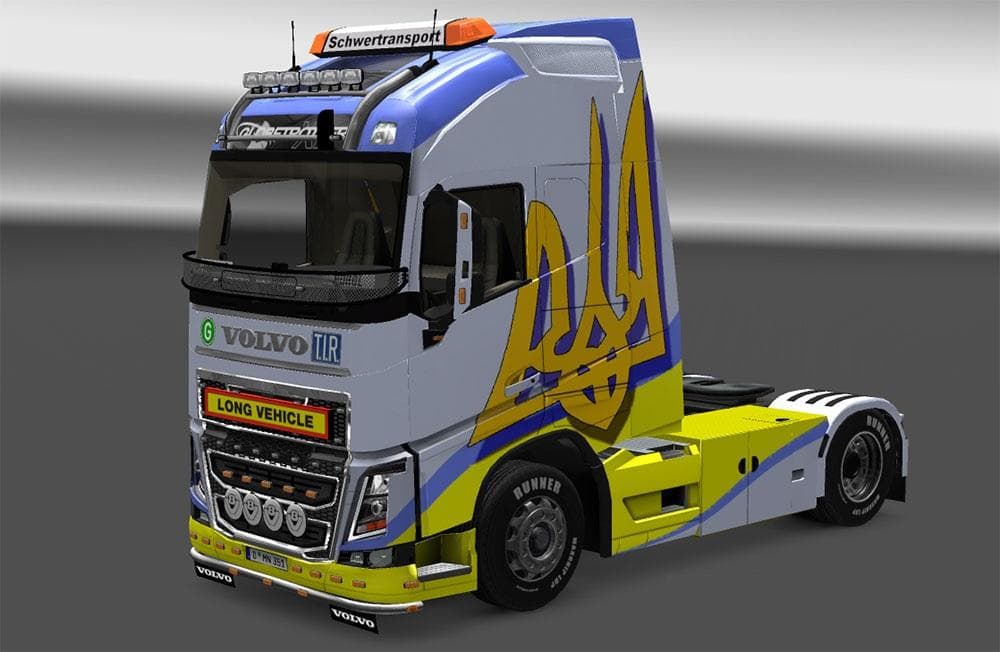
The VOLVO UKRAINE NATIONAL COLOR SKIN is a paint job designed specifically for the Volvo FH models from 2012 and 2013. This skin applies the colors representing Ukraine's national identity onto the truck's exterior, giving it a distinct regional look. It works by repainting the existing vehicle without altering its structure or performance, so it fits neatly into the game's customization options.
Skin mods like this one are popular in Euro Truck Simulator 2 because they allow players to personalize their vehicles with different visual styles. Once installed, these skins are selected in the paint shop when customizing your truck. Since they rely on the base model, it's important to ensure compatibility with the correct Volvo FH versions, which this mod supports for ETS2 versions 1.19 and 1.3.
When used alongside other mods, skins generally don't interfere much with gameplay or other modifications unless they target the same vehicle or paint layers. It's wise to load skin mods after any heavy vehicle overhaul mods to avoid conflicts and ensure your chosen design appears correctly. The VOLVO UKRAINE NATIONAL COLOR SKIN should slot smoothly into a modded setup focused on enhancing truck aesthetics.
This mod is well suited for players who enjoy adding cultural or national themes to their fleet. Whether you have an interest in Ukraine or just want something different from standard factory colors, this skin offers a simple way to stand out on virtual roads.
Since details like file size and creator are unknown, users should back up their profiles before installation as a precaution. Overall, if you're running ETS2 on supported versions and want a straightforward color update for your Volvo FH trucks, this skin serves that purpose without fuss.
How to install
1. Download the .scs file. 2. Drop it into `Documents/Euro Truck Simulator 2/mod/`. 3. Enable in Mod Manager. 4. Apply the skin in the truck/trailer paint shop.
After the mod loads, save your game inside a safe area (parking lot or service) before deciding whether to keep it. If the game refuses to load with the mod enabled, check that all required DLCs are installed and that the supported ETS2 version chips on this page include your installed game patch.
Reviews
No ratings yetNo reviews yet — be the first to rate this mod.





