VOLVO HOLLAND SKIN
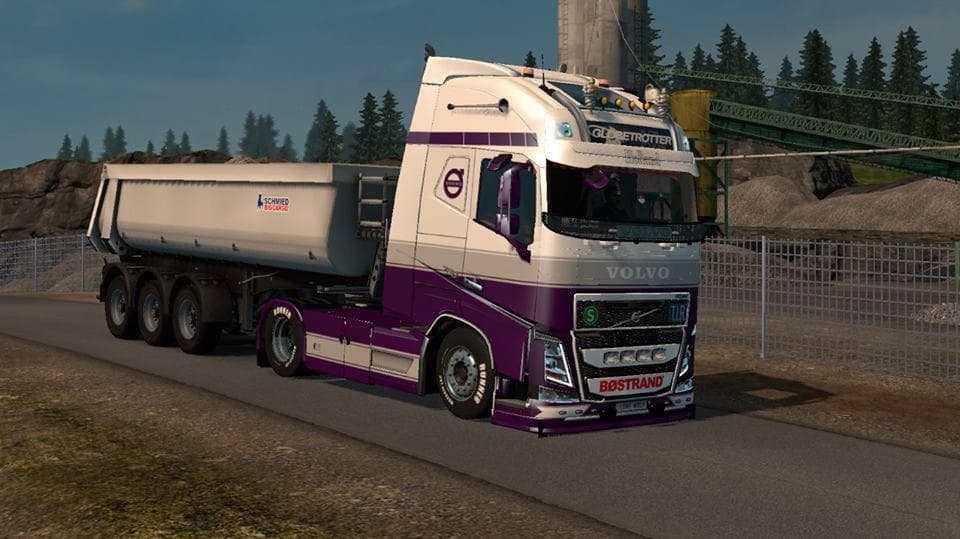
The VOLVO HOLLAND SKIN is a skin mod created by Euro Truck Simulator 2 for the Ohaha Volvo 2013 v19.6s. The file size is 718 KB and can be downloaded from uploa
The VOLVO HOLLAND SKIN is a repaint designed specifically for the Ohaha Volvo 2013 model in Euro Truck Simulator 2. This type of mod doesn't alter the truck's structure or performance but gives it a fresh, custom look by changing its exterior paint and textures. Skins like this one are applied through the game's paint shop, so you’ll need to own the base Volvo model it was made for to use the new design.
Skin mods are popular among players who want to personalize their trucks without messing with gameplay mechanics. They fit neatly into a modded setup since they usually don't conflict with other vehicle or map mods. However, it’s good practice to keep an eye on load order when using multiple skins or truck mods, as some might overwrite each other if loaded incorrectly.
This skin could be a nice addition if you prefer driving Volvos and enjoy adding regional or thematic visuals to your fleet. Since it's themed around Holland, it might appeal to those who like representing specific countries or regions in ETS2. Remember that compatibility depends on having the matching truck model and ensuring your ETS2 version supports the mod.
Players who often swap between different skins or run several cosmetic mods will find this repaint straightforward to integrate. It’s a simple way to add variety and character to your vehicles without affecting game stability. If you’re running a heavily modded game, just check how this skin interacts with other visual mods for smooth loading.
Overall, VOLVO HOLLAND SKIN suits drivers looking for aesthetic customization focused on Volvo trucks within ETS2’s diverse modding community. It adds visual diversity while keeping everything under the hood unchanged, which many players appreciate when customizing their gaming experience.
How to install
1. Download the .scs file. 2. Drop it into `Documents/Euro Truck Simulator 2/mod/`. 3. Enable in Mod Manager. 4. Apply the skin in the truck/trailer paint shop.
After the mod loads, save your game inside a safe area (parking lot or service) before deciding whether to keep it. If the game refuses to load with the mod enabled, check that all required DLCs are installed and that the supported ETS2 version chips on this page include your installed game patch.
Reviews
No ratings yetNo reviews yet — be the first to rate this mod.





