VOLVO FH16 CLASSIC NUR TRANS RED SKIN 1.19.X
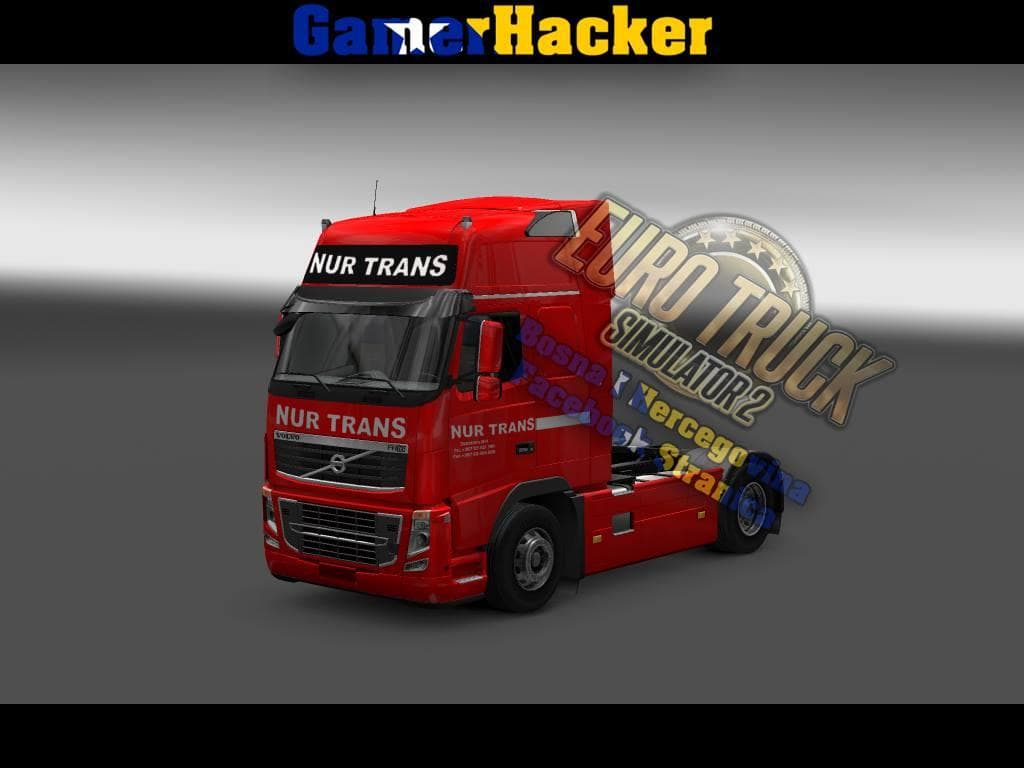
This mod offers a repaint for the Volvo FH16 Classic truck, specifically designed for ETS2 version 1.19.x. It presents a red color scheme with standalone decals and is intended for the Globetrotter XL cabin variant. As a skin mod, it doesn't alter the truck's model or performance but changes its appearance in the paint shop.
Skin mods like this one are popular among players who want to customize their fleet without affecting gameplay mechanics. They work by applying new textures over the base vehicle, allowing for visual variety while keeping compatibility with other mods that affect performance or add new parts. Since this mod targets a specific cabin and game version, it fits well into setups that include other mods tailored to the Volvo FH16 series.
When using skin mods, load order typically places them after map or gameplay changes to avoid conflicts, especially if multiple skins are installed for the same truck model. This mod should coexist smoothly with other visual enhancements but might overwrite any existing skins applied to the Globetrotter XL cabin on Volvo FH16 Classic trucks.
Players interested in giving their Volvo FH16 Classic a fresh look in red without changing its underlying features will find this mod suitable. It's particularly useful for those running ETS2 1.19 who want to maintain consistency across their mods while updating their truck’s appearance.
How to install
1. Download the .scs file. 2. Drop it into `Documents/Euro Truck Simulator 2/mod/`. 3. Enable in Mod Manager. 4. Apply the skin in the truck/trailer paint shop.
After the mod loads, save your game inside a safe area (parking lot or service) before deciding whether to keep it. If the game refuses to load with the mod enabled, check that all required DLCs are installed and that the supported ETS2 version chips on this page include your installed game patch.
Reviews
No ratings yetNo reviews yet — be the first to rate this mod.





