Volvo FH13 Sovtransavto
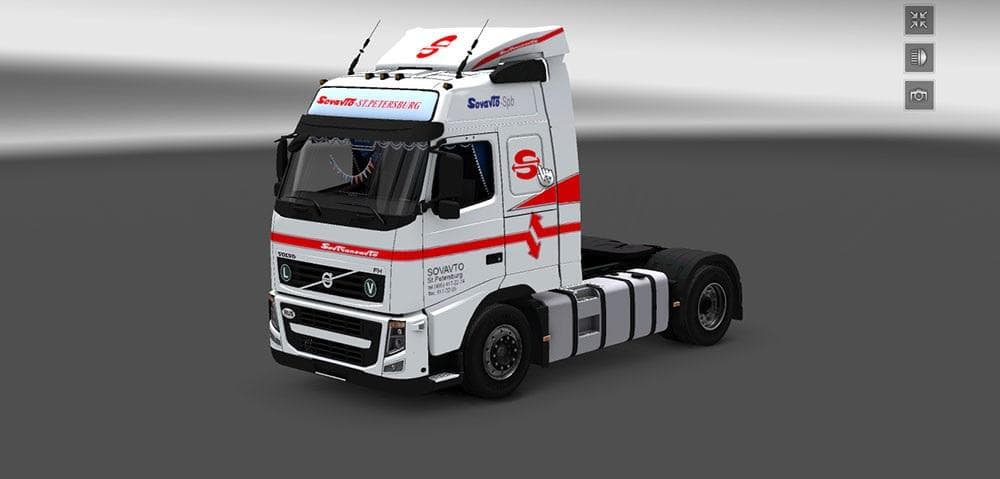
This mod offers a corrected Volvo FH13 with Sovtransavto skin for ETS2, fixing all bugs including those in the log. The skin is original and cannot be removed,
The Volvo FH13 Sovtransavto skin mod gives a fresh paint job to the classic Volvo FH13 truck, focusing on the Sovtransavto design. It doesn't alter the truck model itself but changes its appearance through a repaint. Skin mods like this one are installed via the game's paint shop and require the corresponding base vehicle to work properly.
In Euro Truck Simulator 2, skins serve as cosmetic upgrades, letting players personalize their trucks without affecting performance or handling. This particular mod fixes bugs from previous versions, aiming for a cleaner experience without errors in the game logs. Skins are generally straightforward additions but depend heavily on compatibility with your installed truck version.
When building a modded setup, skin mods usually come last in your load order since they don't conflict with gameplay mechanics or map changes. However, you still need to ensure you're running the correct base truck model to avoid issues. This skin is marked as non-removable within its files, which means it stays applied once activated until manually disabled by the player.
Truck enthusiasts who favor authenticity and enjoy customizing their fleet will find this mod interesting. It fits well in setups that include various branded skins or those wanting to showcase Soviet-era transport livery while driving across regions like Russia or neighboring countries.
Overall, this mod adds visual variety for players looking to refresh their Volvo FH13 with a specific historical look tied to Sovtransavto branding. It's simple yet effective for those who appreciate detailed skins without changing core gameplay elements.
How to install
1. Download the .scs file. 2. Drop it into `Documents/Euro Truck Simulator 2/mod/`. 3. Enable in Mod Manager. 4. Apply the skin in the truck/trailer paint shop.
After the mod loads, save your game inside a safe area (parking lot or service) before deciding whether to keep it. If the game refuses to load with the mod enabled, check that all required DLCs are installed and that the supported ETS2 version chips on this page include your installed game patch.
Reviews
No ratings yetNo reviews yet — be the first to rate this mod.





