VOLVO FH CLASSIC NUR TRANS RED SKIN
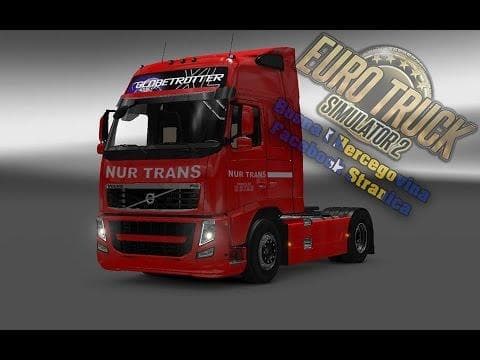
This skin mod for the Volvo FH Classic in ETS2 is designed for version 1.22.x and Mod Manager, featuring standalone decals, 4K resolution, metallic skin option,
The VOLVO FH CLASSIC NUR TRANS RED SKIN is a repaint mod designed specifically for the Volvo FH Classic model with the Globetrotter XL cabin. It offers a red metallic finish that changes the truck's appearance without altering its original structure or performance. This type of mod focuses purely on aesthetics, providing a fresh look by applying new textures and decals to the existing vehicle model.
Skin mods like this one are installed through the paint shop in Euro Truck Simulator 2, where players can select them as an alternative to the default truck paint options. Because it depends on the base vehicle, it only works with compatible Volvo FH Classic trucks, so players need to ensure their game includes this model before using the skin. The 4K resolution of this repaint helps maintain detail even at close viewing distances.
In a modded setup, skins usually have minimal impact on game stability and generally don't conflict with other mods unless those mods alter the same vehicle textures or models. Load order tends not to be critical for skins but keeping them organized is still good practice. Players often pair skins with sound packs or tuning mods to personalize their trucking experience further.
This skin supports ETS2 version 1.22, so users should confirm their game version matches or is compatible to avoid loading issues. It also features standalone decals, meaning additional graphic elements are included separately for flexibility or customization without modifying the main texture file.
Those who prefer visual customization and want their Volvo FH Classic truck in a bold red metallic finish would find this skin fitting. It's suitable for players who like to tailor their fleet’s look without changing gameplay mechanics or adding complex modifications.
How to install
1. Download the .scs file. 2. Drop it into `Documents/Euro Truck Simulator 2/mod/`. 3. Enable in Mod Manager. 4. Apply the skin in the truck/trailer paint shop.
After the mod loads, save your game inside a safe area (parking lot or service) before deciding whether to keep it. If the game refuses to load with the mod enabled, check that all required DLCs are installed and that the supported ETS2 version chips on this page include your installed game patch.
Reviews
No ratings yetNo reviews yet — be the first to rate this mod.





