Volvo FH 2013 Nargis Fakhr Skin
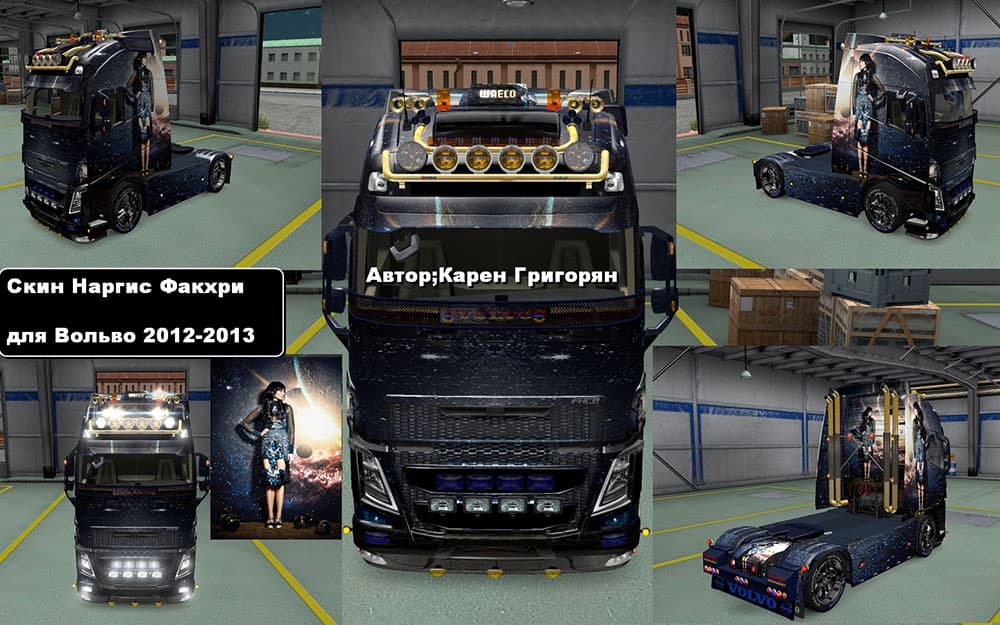
This mod offers the Nargis Fakhr Skin for the Volvo FH 2013 truck in Euro Truck Simulator 2 version 1.22. Created by Euro Truck Simulator 2, the file size, upda
The Volvo FH 2013 Nargis Fakhr Skin is a repaint mod designed for the Volvo FH 2013 truck in Euro Truck Simulator 2. It changes the truck's visual appearance without altering its model or functionality. Skins like this one are applied through the in-game paint shop, allowing players to customize their trucks with different looks based on existing vehicle models.
Skin mods generally don't affect gameplay mechanics but focus solely on aesthetic customization. They rely on the base vehicle being present in your game, so this skin requires the original Volvo FH 2013 truck to work properly. Because of that dependency, skins are often easy to add or remove without causing conflicts with other types of mods like trucks or maps.
When adding skins to a modded setup, it's wise to keep an eye on load order to avoid overwriting other paint jobs unintentionally. Usually, skins can be placed after core vehicle mods in your mod manager. Since this particular skin supports ETS2 version 1.22, compatibility with newer versions might be limited unless updated versions exist elsewhere.
Players who enjoy personalizing their fleet and want a specific look for their Volvo FH 2013 will find this mod useful. It fits well for those who prefer visual variety over functional changes and want something unique to stand out during their hauls across European roads.
While details about the creator and file size are unknown, the skin has been tested with ETS2 version 1.22, indicating it should work smoothly within that version environment. Users should always back up their profiles before installing any mods just in case issues arise.
How to install
1. Download the .scs file. 2. Drop it into `Documents/Euro Truck Simulator 2/mod/`. 3. Enable in Mod Manager. 4. Apply the skin in the truck/trailer paint shop.
After the mod loads, save your game inside a safe area (parking lot or service) before deciding whether to keep it. If the game refuses to load with the mod enabled, check that all required DLCs are installed and that the supported ETS2 version chips on this page include your installed game patch.
Reviews
No ratings yetNo reviews yet — be the first to rate this mod.





