Volvo FH 2009 Zandbergen’s Transport Skin
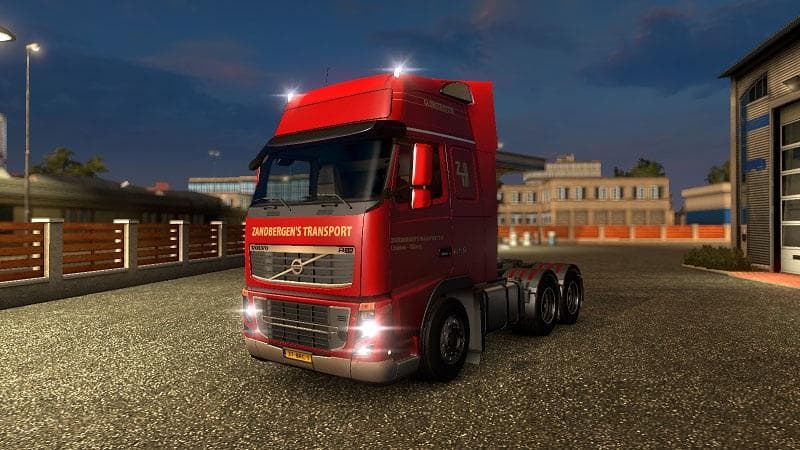
This mod is the Zandbergen’s Transport Skin for Volvo FH16 2009 in Euro Truck Simulator 2. Enjoy using this skin, although the logo cannot be placed in the ligh
The Volvo FH 2009 Zandbergen’s Transport Skin is a repaint mod designed specifically for the Volvo FH16 2009 model in Euro Truck Simulator 2. It changes the truck's exterior appearance without modifying the vehicle's base model or performance. Skins like this one are applied directly in the paint shop, allowing players to customize their trucks with different liveries that represent various companies or styles.
Skin mods such as this one don't alter gameplay mechanics but add visual variety, making your fleet stand out on the road. Since it relies on the original Volvo FH16 2009 truck model, it requires that base vehicle to be installed and active in your mod list. These skins typically load after the main truck models, so placing them correctly in your mod manager can prevent conflicts and ensure they display properly.
This type of mod fits well into a heavily customized setup where players want to reflect real-world trucking companies or simply prefer a specific look for their vehicles. It doesn't impact performance or other mods, so it's generally compatible with most setups unless another skin targets the same truck with higher priority in load order.
Truck enthusiasts who enjoy personalizing their rigs or those looking to simulate specific transport companies will find this skin useful. While it doesn’t include additional features like custom logos on lightboxes due to limitations, it still adds an authentic touch to the Volvo FH16 2009's appearance during long hauls across regions like Germany, France, or The Netherlands.
Applying this skin is straightforward: once installed and enabled alongside the correct truck base, you can select it from the paint shop menu. It's an easy way to refresh your in-game visuals without altering core gameplay elements.
How to install
1. Download the .scs file. 2. Drop it into `Documents/Euro Truck Simulator 2/mod/`. 3. Enable in Mod Manager. 4. Apply the skin in the truck/trailer paint shop.
After the mod loads, save your game inside a safe area (parking lot or service) before deciding whether to keep it. If the game refuses to load with the mod enabled, check that all required DLCs are installed and that the supported ETS2 version chips on this page include your installed game patch.
Reviews
No ratings yetNo reviews yet — be the first to rate this mod.





