VOLVO 2009 NEW LIGHTBOX DECAL
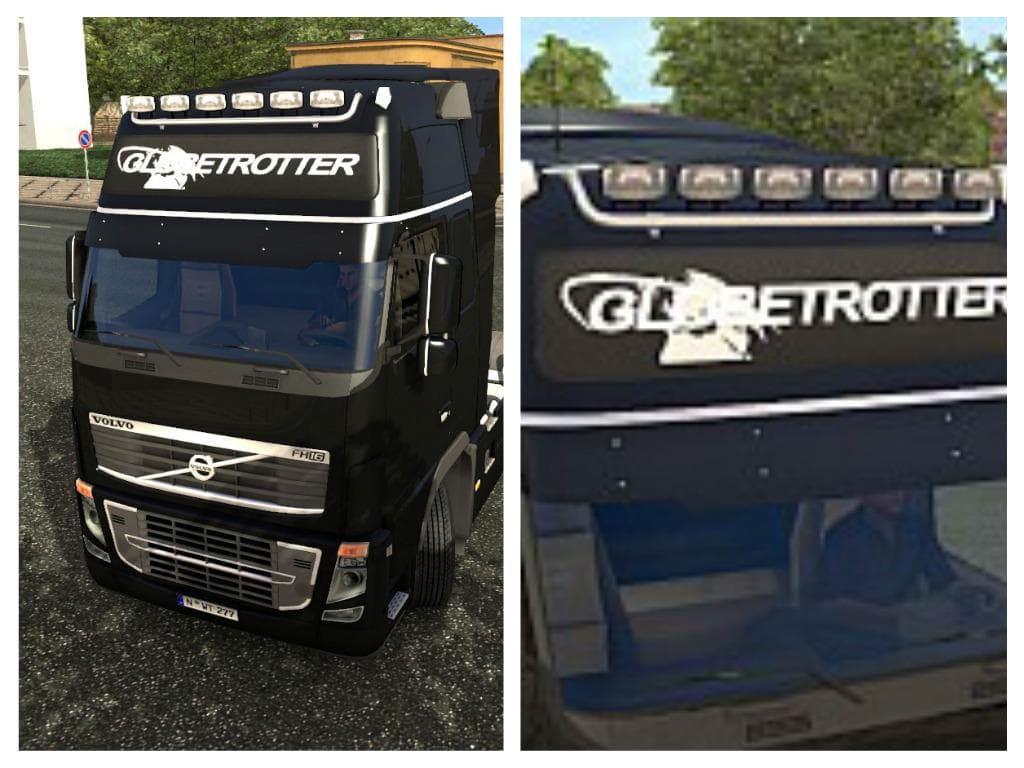
VOLVO 2009 NEW LIGHTBOX DECAL is an ETS2 unknown.
The VOLVO 2009 NEW LIGHTBOX DECAL mod changes the light-box texture on the Volvo 2009 model in Euro Truck Simulator 2. Instead of the original look, it applies the style seen on Volvo trucks from 2012, giving a subtle update without altering the truck's shape or mechanics. This kind of mod is classified as a skin, which means it repaints or textures an existing vehicle rather than adding new models or parts.
Skin mods like this one are installed through the game's paint shop interface and rely on the base truck they were designed for—in this case, the Volvo 2009. They don't affect gameplay but let you customize your rig’s appearance to better match your preferences or desired style. Since it only changes textures, it generally plays well with other mods that modify performance or add features.
When setting up a modded game profile, skin mods should be loaded after any mods that alter the truck’s model or physical attributes to ensure textures display correctly. Conflicts are rare but can happen if multiple skins target the same vehicle and texture slots, so managing load order is recommended if you run several skins simultaneously.
This decal suits players who like to keep their fleet looking updated without switching to completely different models. It fits nicely into setups focused on visual tweaks and realism tweaks where maintaining original truck shapes while refreshing details is preferred. If you enjoy tweaking your Volvo’s look to stand out subtly on ETS2 roads across regions like Germany, France, or Sweden, this mod will serve that purpose well.
Since no version compatibility details are provided, it's wise to check for updates and test in a controlled save before committing to long hauls with this decal active. These types of visual mods typically work across multiple ETS2 versions unless major game updates change how textures are handled.
Overall, this mod provides a straightforward way to give your Volvo 2009 a newer aesthetic feel by borrowing elements from newer model years without complicating your setup or adding extra load times.
How to install
1. Download the .scs file. 2. Drop it into `Documents/Euro Truck Simulator 2/mod/`. 3. Enable in Mod Manager. 4. Apply the skin in the truck/trailer paint shop.
After the mod loads, save your game inside a safe area (parking lot or service) before deciding whether to keep it. If the game refuses to load with the mod enabled, check that all required DLCs are installed and that the supported ETS2 version chips on this page include your installed game patch.
Reviews
No ratings yetNo reviews yet — be the first to rate this mod.





