THE PHOENIX SKIN FOR RJL SCANIA LONGLINE
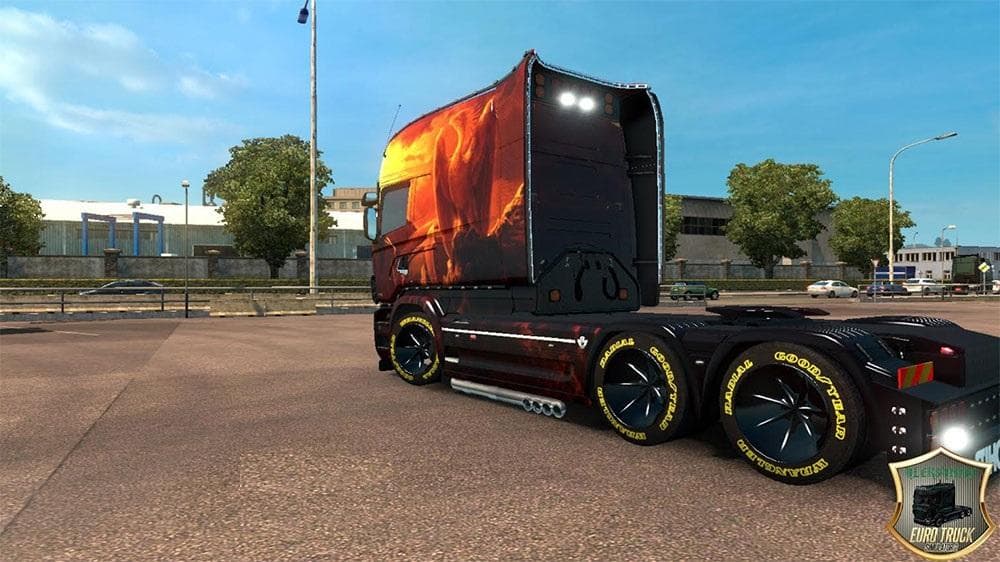
THE PHOENIX SKIN FOR RJL SCANIA LONGLINE is an ETS2 skins. Listed compatible with ETS2 1.21.
The Phoenix skin for the RJL Scania Longline offers a new paint design specifically made for this truck model in Euro Truck Simulator 2 version 1.21. Skins like this one repaint an existing vehicle without altering its structure or performance. They are applied through the in-game paint shop and rely on having the base truck installed, in this case, the RJL Scania Longline mod.
Skin mods generally serve to customize your trucks’ appearance to better match your personal style or thematic preferences. Since this is a paint job designed for a popular longline cabin, it fits well within any modded setup featuring enhanced Scania models. It won't change gameplay but adds visual variety to your fleet.
When using skin mods, it's important to load them after the base truck mod to ensure they display correctly. Conflicts are rare with skins since they only affect textures, but always check compatibility if you run multiple visual mods. This particular skin is compatible with ETS2 version 1.21, so players should confirm their game version matches before installing.
This type of mod appeals mostly to players who enjoy tweaking their trucks' looks without modifying the core model or functionality. If you already use the RJL Scania Longline and want a fresh look that stands out on European roads, this skin could be a good fit.
How to install
1. Download the .scs file. 2. Drop it into `Documents/Euro Truck Simulator 2/mod/`. 3. Enable in Mod Manager. 4. Apply the skin in the truck/trailer paint shop.
After the mod loads, save your game inside a safe area (parking lot or service) before deciding whether to keep it. If the game refuses to load with the mod enabled, check that all required DLCs are installed and that the supported ETS2 version chips on this page include your installed game patch.
Reviews
No ratings yetNo reviews yet — be the first to rate this mod.





