SOUND FIXES PACK + HOT PURSUIT SOUNDS V11.3
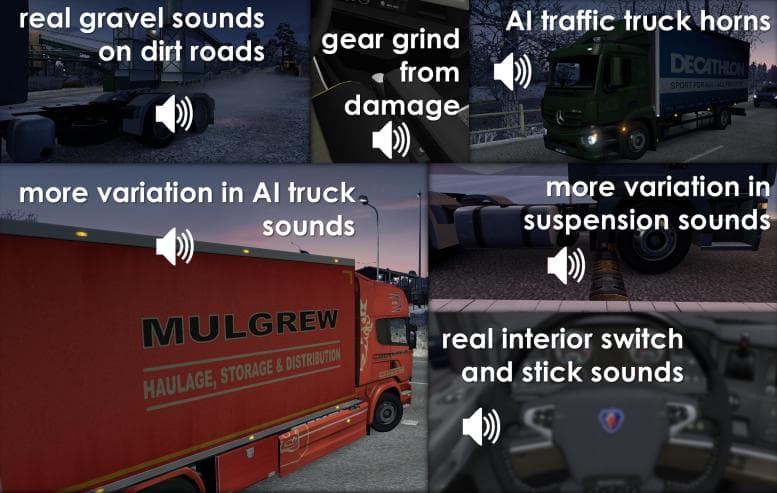
The SOUND FIXES PACK + HOT PURSUIT SOUNDS mod by Euro Truck Simulator 2 enhances the game with immersive and realistic sound replacements. Version 11.3 includes
The SOUND FIXES PACK + HOT PURSUIT SOUNDS V11.3 mod replaces the default audio elements in Euro Truck Simulator 2, focusing on engine noises, horns, and other environmental sounds. By swapping out these stock sounds, it aims to create a more immersive driving experience that feels closer to real life. This kind of sound mod can significantly change how you perceive your truck and surroundings while on the road.
Sound mods like this one generally work by overwriting the game’s original sound files with new audio clips. They usually need to be placed high in your mod load order, especially above any truck or vehicle mods that alter engine sounds or horn effects, to ensure their replacements actually take effect. Conflicts might occur if multiple sound mods are loaded simultaneously without proper ordering.
When included in a modded setup, this pack fits well alongside visual enhancements and map expansions because it enhances immersion without altering gameplay mechanics. Players who like a more authentic auditory feel during long hauls will find it suits their style. Since it changes fundamental audio elements, it's wise to back up original files or use a mod manager for easy toggling.
Those looking for richer soundscapes during their drives across regions such as Germany, France, or Spain might appreciate what this pack offers. It brings a different dimension to familiar routes by refreshing what your ears pick up while cruising highways or navigating city streets.
While specifics about compatibility and supported ETS2 versions aren't provided here, typical sound mods require careful placement in the load order and may need occasional updates after game patches to keep working smoothly. Users who frequently update their ETS2 version should keep an eye on such details when using any extensive sound overhaul.
How to install
1. Download the .scs file. 2. Drop it into `Documents/Euro Truck Simulator 2/mod/`. 3. Enable in Mod Manager. Sound mods usually need to load **above** truck mods in load order. 4. Restart the game so the audio engine picks up new samples.
After the mod loads, save your game inside a safe area (parking lot or service) before deciding whether to keep it. If the game refuses to load with the mod enabled, check that all required DLCs are installed and that the supported ETS2 version chips on this page include your installed game patch.
Reviews
No ratings yetNo reviews yet — be the first to rate this mod.





