Skins Russian Companies for Tanks Fuel JTZ
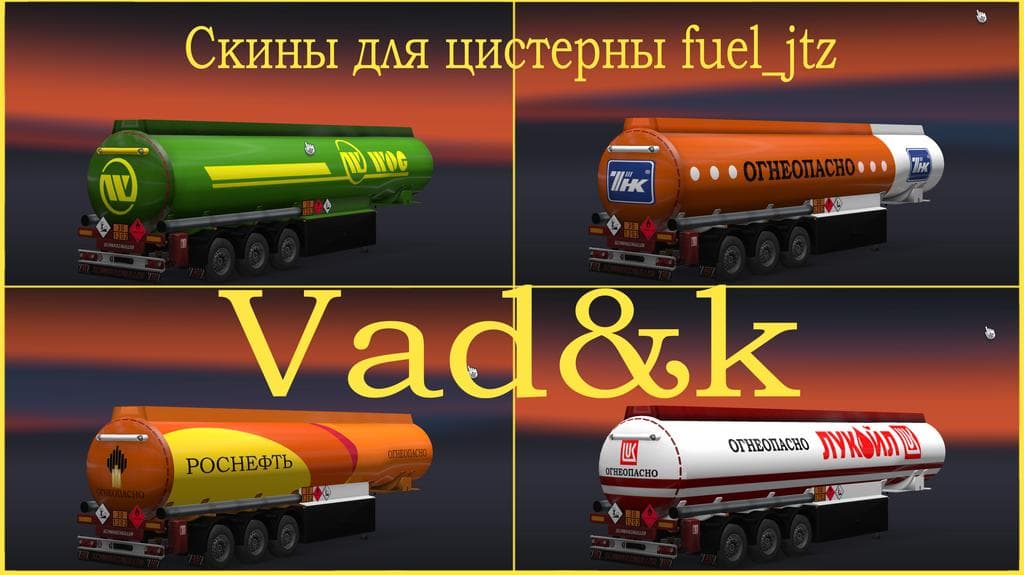
This mod adds skins of Russian companies for the fuel tank fuel_jtz in ETS2. The pack is designed to work with the model tanks from the trailers_and_cargo_pack_
Skins Russian Companies for Tanks Fuel JTZ offers a selection of paint designs themed around Russian firms, tailored specifically for fuel tank trailers in ETS2. These skins apply to the fuel_jtz model, which is part of the trailer and cargo pack created by Jazzycat. By repainting this particular tank, the mod allows players to customize their trailers with a distinctly Russian appearance without altering the underlying model.
Skin mods like this one function by changing the visual textures on trucks or trailers rather than modifying their shape or performance. They are usually applied through the in-game paint shop and rely on compatibility with specific base vehicles or trailers. This means you’ll need the Jazzycat trailer pack installed for these skins to work properly with your fuel tanks.
When adding skins to a modded setup, it’s worth considering load order to avoid conflicts, especially if you use multiple skin packs or texture-enhancing mods. Since this mod targets only one type of trailer model, it generally fits well alongside other mods as long as no other skin changes are made to the same item. Keeping your mods organized can help ensure that your customized look appears correctly during gameplay.
This skin pack suits players interested in reflecting regional trucking themes within their haulage experience, particularly those who want to add a touch of Russia's industrial branding to their fleet. If you run routes across Eastern Europe or just want more variety in your trailers’ appearances, these skins provide an easy way to diversify your cargo visuals without affecting gameplay mechanics.
How to install
1. Download the .scs file. 2. Drop it into `Documents/Euro Truck Simulator 2/mod/`. 3. Enable in Mod Manager. 4. Apply the skin in the truck/trailer paint shop.
After the mod loads, save your game inside a safe area (parking lot or service) before deciding whether to keep it. If the game refuses to load with the mod enabled, check that all required DLCs are installed and that the supported ETS2 version chips on this page include your installed game patch.
Reviews
No ratings yetNo reviews yet — be the first to rate this mod.





