SKIN PACK HOVING TRANSPORT 1.22.X
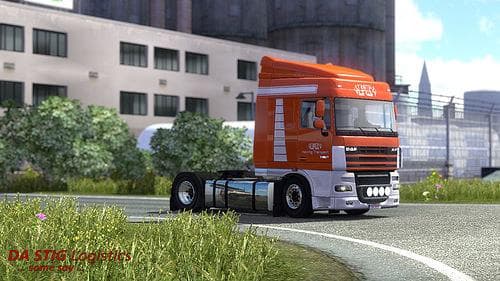
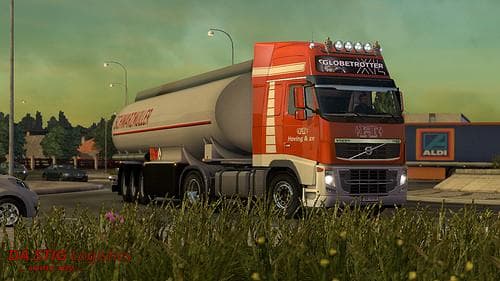
This skin pack mod for ETS2 version 1.22 includes skins for Volvo FH 2009, Volvo FH 2012, DAF XF105, and DAF XF Euro6 trucks, featuring designs from Hoving Tran
The SKIN PACK HOVING TRANSPORT 1.22.X is a collection of paint jobs designed for specific truck models in Euro Truck Simulator 2, compatible with version 1.22 of the game. It includes skins for popular trucks like the Volvo FH 2009 and 2012, as well as the DAF XF105 and DAF XF Euro6. These skins do not alter the truck models themselves but provide new visual styles that can be applied in the game's paint shop once the base vehicle is owned.
Skin mods like this one function by repainting existing trucks without changing their physical design or performance. This means they rely on the original truck models present in ETS2 and are loaded through the game's mod manager. Players can customize their fleet's appearance by adding such skins, giving their vehicles a fresh look while keeping all gameplay mechanics intact.
In a modded setup, skin packs typically load without conflicts since they only affect textures rather than core game files or gameplay systems. However, it's wise to place skin mods lower in your load order if you use other mods that alter truck models or add new vehicles to avoid any unexpected overrides. Compatibility is generally straightforward as long as you're running the supported ETS2 version.
This type of mod appeals mostly to players who enjoy personalizing their trucks' appearance and want to expand their collection of liveries beyond what's available in-game. If you own one of the supported trucks and want some additional paint options reflecting real-world transport company designs, this pack fits well into that role.
Overall, SKIN PACK HOVING TRANSPORT brings more variety to your garage by offering a set of themed skins tailored for several Volvo and DAF models, enhancing visual diversity without affecting gameplay.
How to install
1. Download the .scs file. 2. Drop it into `Documents/Euro Truck Simulator 2/mod/`. 3. Enable in Mod Manager. 4. Apply the skin in the truck/trailer paint shop.
After the mod loads, save your game inside a safe area (parking lot or service) before deciding whether to keep it. If the game refuses to load with the mod enabled, check that all required DLCs are installed and that the supported ETS2 version chips on this page include your installed game patch.
Reviews
No ratings yetNo reviews yet — be the first to rate this mod.





