SKIN PACK C.ZWAGERMAN 1.22
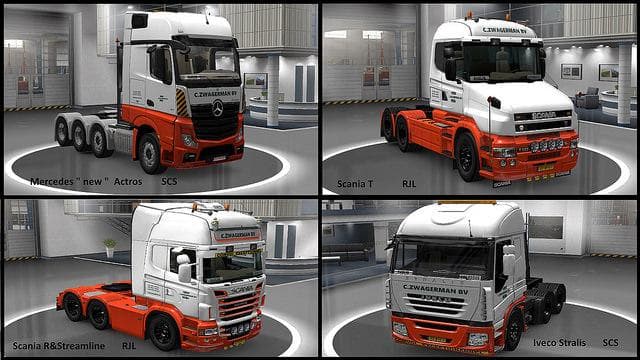
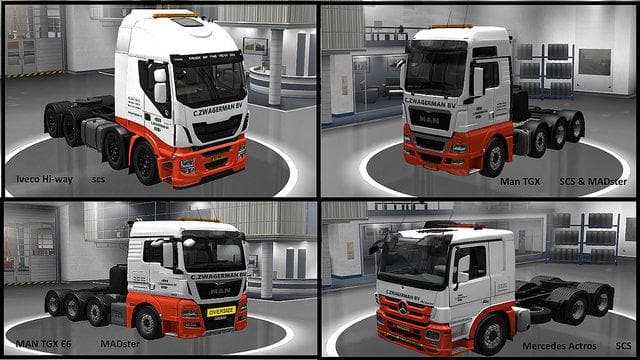
SKIN PACK C.ZWAGERMAN 1.22 is an ETS2 skins. Listed compatible with ETS2 1.22.
The SKIN PACK C.ZWAGERMAN 1.22 is a collection of custom paint jobs for various trucks in Euro Truck Simulator 2, compatible with game version 1.22. This kind of mod doesn't change the truck models themselves but offers new visual styles that can be applied directly in the game's paint shop. It covers several popular vehicles, including multiple Scania and Iveco models, as well as MAN trucks, giving your fleet a refreshed look without altering gameplay mechanics.
Skin mods like this one are designed to repaint existing trucks and trailers, so they rely heavily on the base vehicle versions they were created for. Since this pack targets specific truck variants such as the Scania T RJL and Iveco Hi-Way SCS, players will need those models installed and updated to ensure proper functionality. These skins often add variety to your driving experience by making your trucks stand out on European roads or in custom convoy setups.
In a modded ETS2 environment, skin packs typically load alongside other cosmetic or functional mods without conflicts if installed correctly. It's wise to check load order if you have multiple skin packs targeting the same vehicles to avoid overwriting issues. Because this pack supports version 1.22 of ETS2, it fits neatly with other mods designed for that update cycle, minimizing compatibility concerns during gameplay.
This type of mod appeals mainly to players who want to personalize their trucks beyond the default options available in Euro Truck Simulator 2. Whether you're running a virtual trucking company or just enjoy cruising through Europe with unique liveries, skin packs like this one enhance visual diversity without impacting performance or requiring additional downloads for new truck models.
Overall, SKIN PACK C.ZWAGERMAN offers straightforward customization for drivers looking to refresh their Scania, Iveco, and MAN fleets in ETS2's 1.22 environment. It's an easy way to add some character to your rigs while keeping everything fully compatible with your existing setup.
How to install
1. Download the .scs file. 2. Drop it into `Documents/Euro Truck Simulator 2/mod/`. 3. Enable in Mod Manager. 4. Apply the skin in the truck/trailer paint shop.
After the mod loads, save your game inside a safe area (parking lot or service) before deciding whether to keep it. If the game refuses to load with the mod enabled, check that all required DLCs are installed and that the supported ETS2 version chips on this page include your installed game patch.
Reviews
No ratings yetNo reviews yet — be the first to rate this mod.





