SISU RJL NIGHTWISH SKIN 1.22
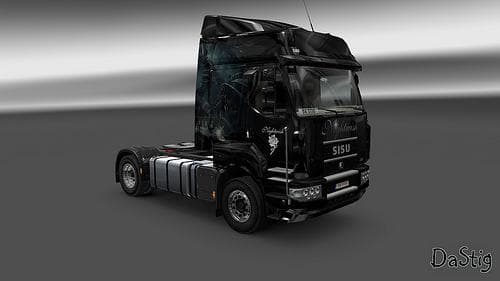
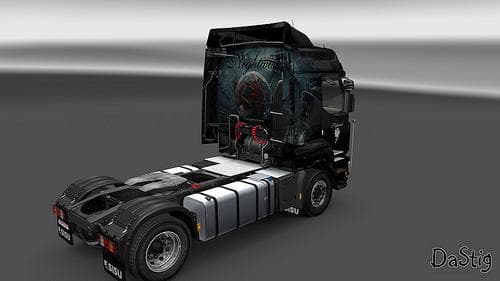
The SISU RJL NIGHTWISH SKIN 1.22 is a skin mod for Euro Truck Simulator 2, version 1.22, featuring a Nightwish design for the Sisu RJL truck. The file size is 2
The SISU RJL NIGHTWISH SKIN 1.22 is a paint job mod designed specifically for the Sisu RJL truck in Euro Truck Simulator 2, compatible with game version 1.22. It changes the truck's exterior look without altering its model or mechanics, offering a fresh visual style for players who own this vehicle. Skins like this one are applied through the in-game paint shop and rely on the base truck being present to work correctly.
Skin mods focus solely on repainting existing trucks, trailers, or cabins rather than introducing new models or functional features. They are straightforward additions that enhance customization by allowing you to tailor your vehicle’s appearance to your preferences or themes you enjoy. Since they don't affect gameplay mechanics, skins are generally easy to use alongside other mods.
When adding skin mods such as this, it’s a good idea to keep track of your load order if you’re running multiple skins or other visual modifications. Usually, skins load last so they override previous paint jobs without conflicts. Because this mod targets the Sisu RJL specifically, it won’t interfere with other trucks or map expansions you might have installed.
Players who prefer the Sisu RJL and want a distinct look for their rig will find this skin suitable. It fits well within a modded setup where personalization is key and complements those who enjoy customizing their fleet's aesthetics rather than focusing solely on gameplay enhancements.
This kind of mod appeals mostly to enthusiasts who want variety in their trucking experience through visual tweaks. If you appreciate subtle changes that make familiar trucks stand out on roads across Europe—from Germany to France—skins like these offer a simple way to refresh your favorite rides without complexity.
How to install
1. Download the .scs file. 2. Drop it into `Documents/Euro Truck Simulator 2/mod/`. 3. Enable in Mod Manager. 4. Apply the skin in the truck/trailer paint shop.
After the mod loads, save your game inside a safe area (parking lot or service) before deciding whether to keep it. If the game refuses to load with the mod enabled, check that all required DLCs are installed and that the supported ETS2 version chips on this page include your installed game patch.
Reviews
No ratings yetNo reviews yet — be the first to rate this mod.





