SELMAN TRANSPORTEN MERCEDES ACTROS MPIV SKIN
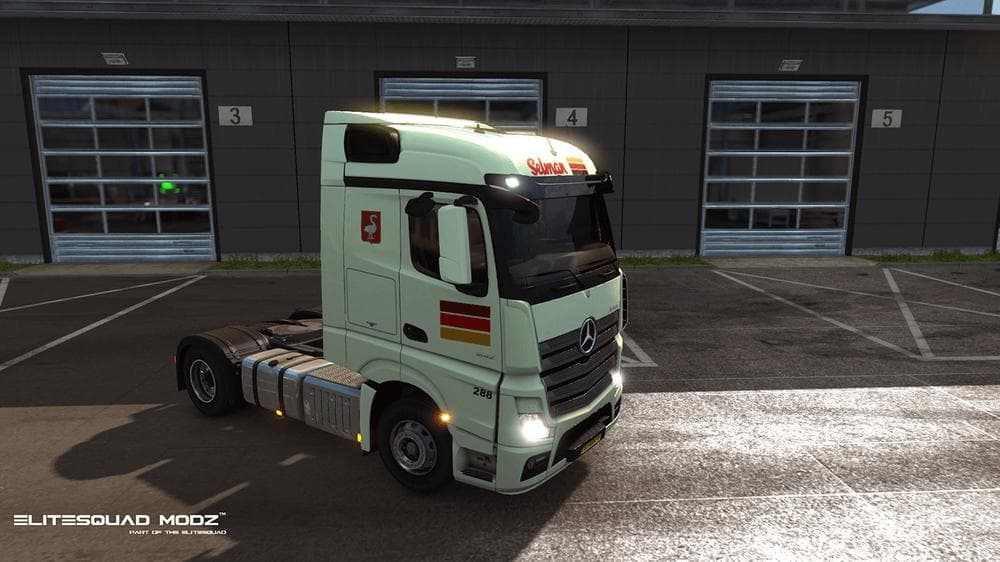
This ETS2 mod offers a skin for the Mercedes Actros MPIV truck, featuring realistic textures for Selman Transporten B.V. based in the Netherlands. The mod detai
The SELMAN TRANSPORTEN MERCEDES ACTROS MPIV SKIN is a repaint mod designed specifically for the Mercedes Actros MPIV truck in Euro Truck Simulator 2. It features textures inspired by Selman Transporten B.V., a company based in the Netherlands, giving the truck a distinct Dutch transport company look. Skins like this one don't alter the truck model itself but change its appearance through new paint jobs applied in the game's paint shop.
Skin mods in ETS2 generally work by recoloring or redesigning existing vehicles, trailers, or cabins without affecting their functionality. This means you can customize your trucks visually while keeping all original driving dynamics intact. Since this skin targets the Actros MPIV model, it requires that base truck to be present and properly installed before use.
When integrating skins into a modded setup, it's common practice to place skins after any gameplay or vehicle mods in your load order. This helps avoid conflicts and ensures that the skin textures display correctly on top of other modifications. Skins usually coexist well with other mods because they only modify appearance files rather than core game mechanics.
Drivers who prefer to add regional flavor or represent specific companies in their virtual fleet might appreciate this skin's realistic depiction of a Dutch trucking firm. It fits well within collections emphasizing European transport companies or those who want their Actros trucks to stand out with authentic liveries.
Although details about version compatibility and file size are not provided, skin mods like this typically support multiple ETS2 versions as long as the corresponding base vehicle remains unchanged. Users should always check for any updates or compatibility notes from the source before installing.
How to install
1. Download the .scs file. 2. Drop it into `Documents/Euro Truck Simulator 2/mod/`. 3. Enable in Mod Manager. 4. Apply the skin in the truck/trailer paint shop.
After the mod loads, save your game inside a safe area (parking lot or service) before deciding whether to keep it. If the game refuses to load with the mod enabled, check that all required DLCs are installed and that the supported ETS2 version chips on this page include your installed game patch.
Reviews
No ratings yetNo reviews yet — be the first to rate this mod.





