Scania T RJL Orange Tribal skin
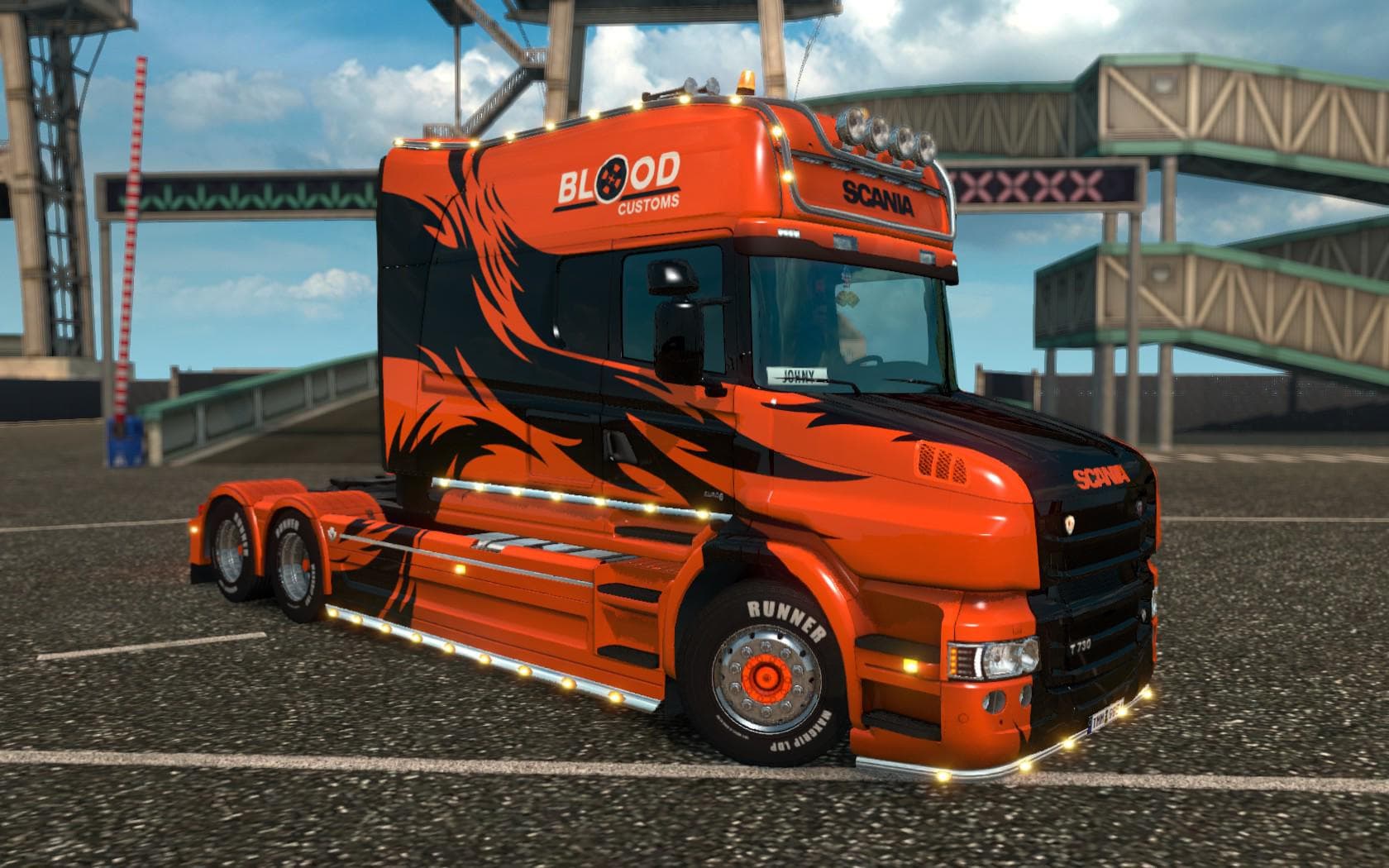
Scania T RJL Orange Tribal skin is a skin mod for Scania T by RJL, inspired by Scania R500 Longline Laröd Åkeri. Created by Euro truck simulator 2, the file siz
The Scania T RJL Orange Tribal skin is a repaint mod designed for the Scania T truck model in Euro Truck Simulator 2. It offers a distinctive orange tribal-themed design, adding a fresh look to the truck's exterior without altering its original shape or features. Skins like this one are applied through the game's paint shop, meaning players can customize their vehicles with unique artwork that fits over the existing model.
Skin mods in ETS2 typically don't change gameplay mechanics but focus on aesthetic enhancements. They rely on compatibility with specific base trucks, so this particular skin works only with the Scania T by RJL. Since it’s just a repaint, it won’t interfere with other mods that affect performance or physics, making it an easy addition to most setups.
When used in a modded environment, skins like the Orange Tribal fit well alongside tuning packs or map expansions since they don’t conflict with those types of modifications. Players should ensure that the skin is loaded after any other skin mods for the same truck to avoid overwriting textures unintentionally. This means placing it lower in your mod load order if you have multiple skins installed for the Scania T.
This kind of mod appeals mainly to players who enjoy personalizing their trucks visually and want something different from the standard paint jobs offered by ETS2. If you’re running a fleet of Scania T trucks or just want your vehicle to stand out on roads across Europe and beyond, this tribal design gives you that option without complicating your mod setup.
Since details about supported game versions or creator info are unknown, it’s wise to check for compatibility updates before use. Still, skin mods generally remain compatible across many versions as long as the underlying truck model hasn’t changed significantly. This makes them low-risk choices for enhancing your driving experience with minimal fuss.
How to install
1. Download the .scs file. 2. Drop it into `Documents/Euro Truck Simulator 2/mod/`. 3. Enable in Mod Manager. 4. Apply the skin in the truck/trailer paint shop.
After the mod loads, save your game inside a safe area (parking lot or service) before deciding whether to keep it. If the game refuses to load with the mod enabled, check that all required DLCs are installed and that the supported ETS2 version chips on this page include your installed game patch.
Reviews
No ratings yetNo reviews yet — be the first to rate this mod.





