Scania Streamline SD1 Skin
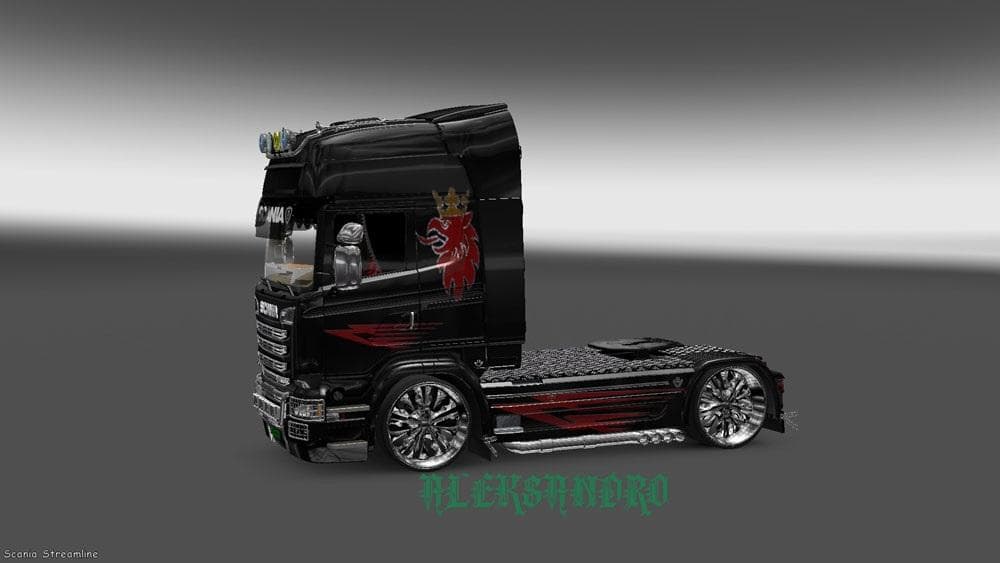
This mod is a Scania Streamline SD1 skin for Euro Truck Simulator 2. It was last updated on April 21, 2015, with unknown file size and supported game versions.
The Scania Streamline SD1 Skin is a repaint mod designed specifically for the Scania Streamline truck model in Euro Truck Simulator 2. Instead of altering the truck's structure or performance, it changes the visual appearance by applying a new paint job. Skins like this one are typically installed through the in-game paint shop, where players can customize their trucks with various color schemes and designs that suit their preferences.
Skin mods generally don't affect gameplay mechanics but can greatly enhance immersion by offering more variety and personalization options. Since this mod depends on the base Scania Streamline vehicle, it requires that truck to be present and up to date within your ETS2 installation. This means it won’t work independently and needs to be loaded alongside the original model.
When setting up a collection of mods, skins are usually placed after gameplay tweaks and map expansions in your load order to avoid conflicts. They tend to be compatible with most other mods as they only change textures rather than game files or scripts. However, if multiple skin mods target the same truck, only one will show up at a time, so you’ll want to manage those carefully.
This particular skin is ideal for players who enjoy customizing their fleet with different looks without changing truck models. It fits well into setups focused on visual customization, allowing users to give their Scania Streamline trucks a fresh appearance that stands out on roads across virtual Europe.
Whether you’re cruising through Spain, Germany, or Sweden, adding new skins like this one brings extra personality to your rides. It’s a straightforward way for ETS2 fans who appreciate cosmetic enhancements to diversify how their vehicles look during long hauls.
How to install
1. Download the .scs file. 2. Drop it into `Documents/Euro Truck Simulator 2/mod/`. 3. Enable in Mod Manager. 4. Apply the skin in the truck/trailer paint shop.
After the mod loads, save your game inside a safe area (parking lot or service) before deciding whether to keep it. If the game refuses to load with the mod enabled, check that all required DLCs are installed and that the supported ETS2 version chips on this page include your installed game patch.
Reviews
No ratings yetNo reviews yet — be the first to rate this mod.





