SCANIA STREAMLINE FANTASY SKIN V2
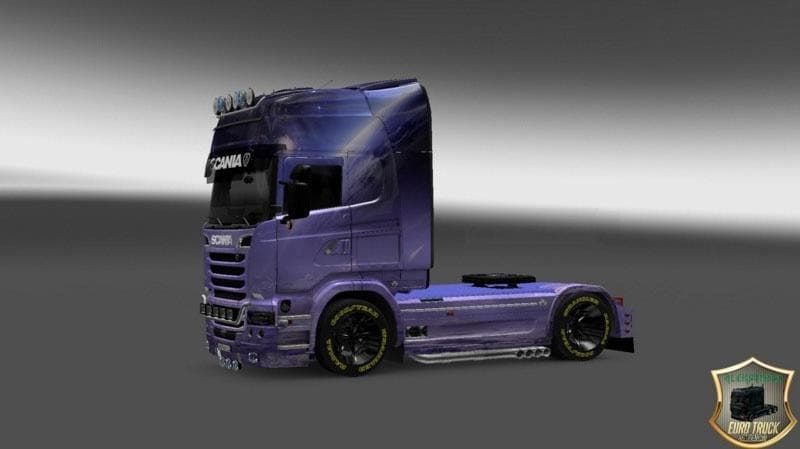
This mod is a fantasy skin for the Scania Streamline truck in ETS2 version 1.22. Created by Euro Truck Simulator 2, it features a unique design and is 5.4 MB in
The SCANIA STREAMLINE FANTASY SKIN V2 is a repaint mod designed for the Scania Streamline truck in Euro Truck Simulator 2. This skin changes the truck's exterior appearance without altering its model or performance. Mods like this one are installed through the paint shop, relying on the base vehicle to function correctly within the game.
Skin mods such as this allow players to customize their trucks with unique visual styles, adding variety without affecting gameplay mechanics. Since it’s built specifically for the Scania Streamline, it won't work with other truck models or cabins. Users typically activate these skins by selecting them in-game after installation.
When integrating this mod into a larger modded setup, it's important to consider load order. Skin mods usually load after map or gameplay mods but before sound or tuning packs to prevent conflicts. Ensuring compatibility with your ETS2 version is also key; this skin supports version 1.22, so using it with newer versions may cause issues unless updated.
Players who enjoy personalizing their fleet and want something different from default paint jobs will find value here. Fantasy-themed skins add a creative touch and help distinguish trucks on European roads, especially if you're running multiple vehicles in convoy or multiplayer sessions.
Since the creator and file size are unknown, users should always back up their profiles before applying new skins. Testing in a controlled environment helps avoid unexpected crashes or visual glitches during longer hauls.
Overall, SCANIA STREAMLINE FANTASY SKIN V2 fits well into any collection of aesthetic enhancements for ETS2 trucks that support version 1.22. It's straightforward to install and provides an easy way to refresh your Scania’s look without complex tweaks.
How to install
1. Download the .scs file. 2. Drop it into `Documents/Euro Truck Simulator 2/mod/`. 3. Enable in Mod Manager. 4. Apply the skin in the truck/trailer paint shop.
After the mod loads, save your game inside a safe area (parking lot or service) before deciding whether to keep it. If the game refuses to load with the mod enabled, check that all required DLCs are installed and that the supported ETS2 version chips on this page include your installed game patch.
Reviews
No ratings yetNo reviews yet — be the first to rate this mod.





