SCANIA SKIN WITH INTERIOR 1.22.X
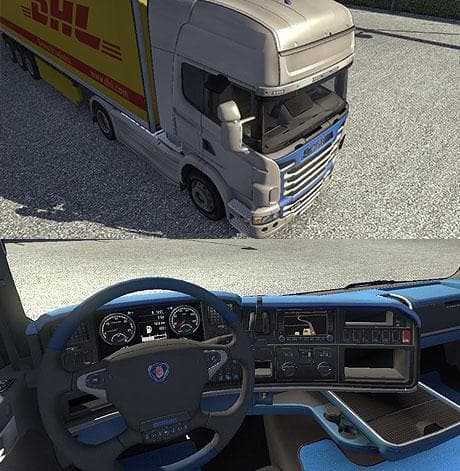
This mod is a Scania skin with interior for ETS2 version 1.22.x, created by Euro Truck Simulator 2. The file size is 638 KB and the credits go to Anohim.
The SCANIA SKIN WITH INTERIOR 1.22.X mod offers a fresh paint job for Scania trucks in Euro Truck Simulator 2, tailored for game version 1.22. Rather than changing the truck's model, this type of mod applies a new look directly through the paint shop, giving your vehicle a personalized touch while preserving its original structure. Skins like this one are straightforward to install and depend on having the matching base truck available in your game files.
Skin mods such as this repaint existing cabins and trailers without altering their shape or mechanics. They typically include both exterior designs and sometimes interior details, enhancing immersion when you're behind the wheel. Since this particular skin also features an interior update, it can add visual variety inside the cabin alongside the external changes.
When using skin mods within a larger modded setup, it's wise to pay attention to load order since skins override default appearances but don't usually conflict with gameplay-altering mods. This skin is compatible specifically with ETS2 version 1.22, so make sure your game version matches to avoid issues. It integrates smoothly with other cosmetic mods as long as they target different trucks or components.
This kind of mod appeals mostly to players who enjoy customizing their fleet visually without touching performance or physics. If you prefer keeping things looking fresh and want your Scania trucks to stand out on European roads, a skin that includes interior detail adds an extra layer of realism and style during long hauls.
Overall, players looking for simple yet effective visual updates will find this Scania skin useful. It fits well into any collection of cosmetic upgrades and can be combined easily with other mods focused on gameplay or map expansions.
How to install
1. Download the .scs file. 2. Drop it into `Documents/Euro Truck Simulator 2/mod/`. 3. Enable in Mod Manager. 4. Apply the skin in the truck/trailer paint shop.
After the mod loads, save your game inside a safe area (parking lot or service) before deciding whether to keep it. If the game refuses to load with the mod enabled, check that all required DLCs are installed and that the supported ETS2 version chips on this page include your installed game patch.
Reviews
No ratings yetNo reviews yet — be the first to rate this mod.





