SCANIA RS TOPLINE (RJL) HIP HOP SKIN
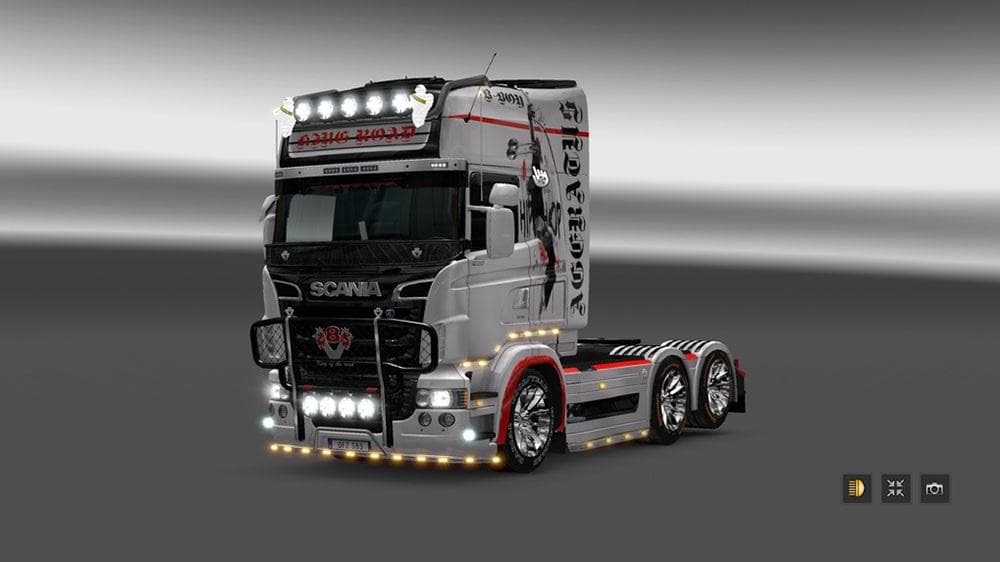
This mod is a Hip Hop Skin for the Scania RS Topline (RJL) truck in ETS2 version 1.22. Created by Euro Truck Simulator 2, the file size and update information a
The SCANIA RS TOPLINE (RJL) HIP HOP SKIN is a paint job mod designed specifically for the Scania RS Topline truck model in Euro Truck Simulator 2. This kind of mod changes the truck's appearance by applying a new graphical design without altering the vehicle's mechanics or shape. Since it’s a skin mod, you apply it in the in-game paint shop where you customize your truck's look.
Skin mods like this one are popular for players who want to personalize their vehicles or give them a unique style that stands out on European roads. They depend entirely on the base model—in this case, the Scania RS Topline (RJL)—so they won’t work with other trucks unless explicitly adapted. These mods don't affect gameplay but add visual variety and can enhance immersion if you’re going for a specific theme.
When adding skins to your mod setup, it's good to keep load order in mind. Usually, skins should be loaded after any map or gameplay mods to prevent conflicts. Also, since this skin was tested with ETS2 version 1.22, compatibility with newer versions may vary and could require updates from the creator.
This particular hip hop-themed skin offers a distinctive urban aesthetic that could appeal to players who enjoy customizing their trucks beyond factory styles. It’s an option for those who like blending culture-inspired designs into their trucking experience without changing core game elements.
Because skins are relatively light on resources and easy to install by placing them in the mod folder, they fit well into most modded setups. If you already use several mods, just make sure there aren’t conflicting skins targeting the same truck model at once.
Overall, this SCANIA RS TOPLINE (RJL) HIP HOP SKIN caters mainly to players looking to refresh their favorite Scania with a bold look tied to hip hop culture, offering something visually different compared to standard paint jobs.
How to install
1. Download the .scs file. 2. Drop it into `Documents/Euro Truck Simulator 2/mod/`. 3. Enable in Mod Manager. 4. Apply the skin in the truck/trailer paint shop.
After the mod loads, save your game inside a safe area (parking lot or service) before deciding whether to keep it. If the game refuses to load with the mod enabled, check that all required DLCs are installed and that the supported ETS2 version chips on this page include your installed game patch.
Reviews
No ratings yetNo reviews yet — be the first to rate this mod.





