SCANIA RJL V.D.VLIST SKIN
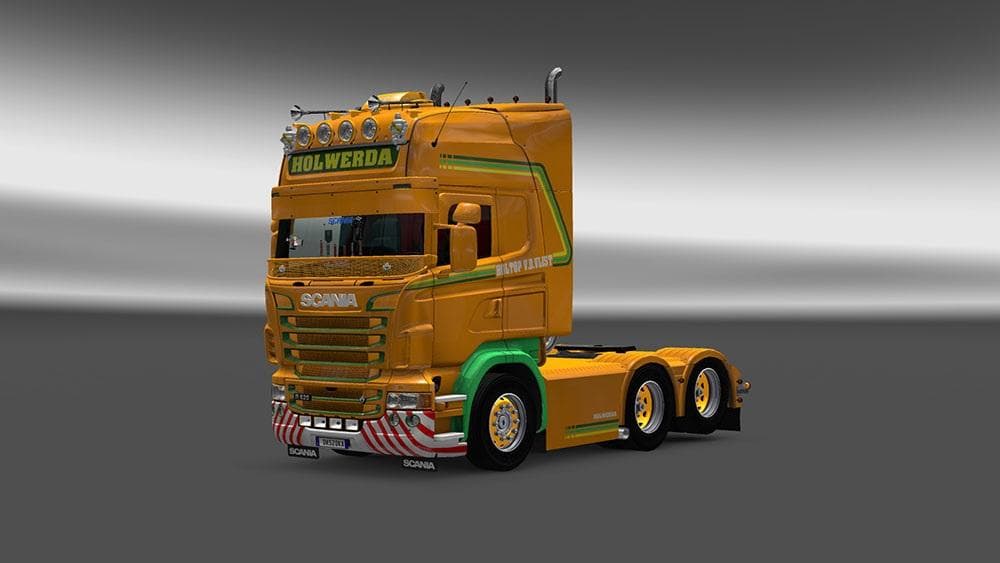
This skin mod for Scania RJL trucks was tested on ETS2 versions 1.4, 1.20, 1.21, and 1.22. Created by Euro Truck Simulator 2, the file size and update informati
The SCANIA RJL V.D.VLIST SKIN is a repaint mod designed for the Scania RJL truck in Euro Truck Simulator 2. Skin mods like this one don't alter the truck's model or performance but change its visual appearance, giving your rig a fresh look without affecting gameplay mechanics. Since it's applied through the paint shop, you'll need to own the base Scania RJL model to use this skin.
These types of skins are popular among players who want to personalize their trucks and stand out on the road. They work by replacing or adding textures to the existing vehicle, which means they generally stay compatible with other mods that don't modify the same files. However, it's wise to load skins after any mods that alter vehicle models or textures to avoid conflicts.
The SCANIA RJL V.D.VLIST SKIN has been tested on several ETS2 versions including 1.4, 1.20, 1.21, and 1.22, so it fits well into a modded setup running those game releases. Since it targets a specific truck model and game versions, users should ensure their ETS2 version aligns with one of those supported before installation.
Players who enjoy customizing their trucks and want more variety in their fleet would appreciate adding this skin to their collection. It doesn't add new features but enhances visual diversity during long hauls across various European regions.
Given its focus on aesthetics rather than functionality, this mod pairs nicely with map expansions or cargo packs as it won't interfere with gameplay balance or physics. Just remember that skins usually require careful placement in your mod manager's load order when combined with other visual mods.
Overall, if you drive a Scania RJL and want a different paint scheme without fussing over compatibility issues, this skin offers an easy way to refresh your truck's look.
How to install
1. Download the .scs file. 2. Drop it into `Documents/Euro Truck Simulator 2/mod/`. 3. Enable in Mod Manager. 4. Apply the skin in the truck/trailer paint shop.
After the mod loads, save your game inside a safe area (parking lot or service) before deciding whether to keep it. If the game refuses to load with the mod enabled, check that all required DLCs are installed and that the supported ETS2 version chips on this page include your installed game patch.
Reviews
No ratings yetNo reviews yet — be the first to rate this mod.





