SCANIA RJL UPPMANS SKIN
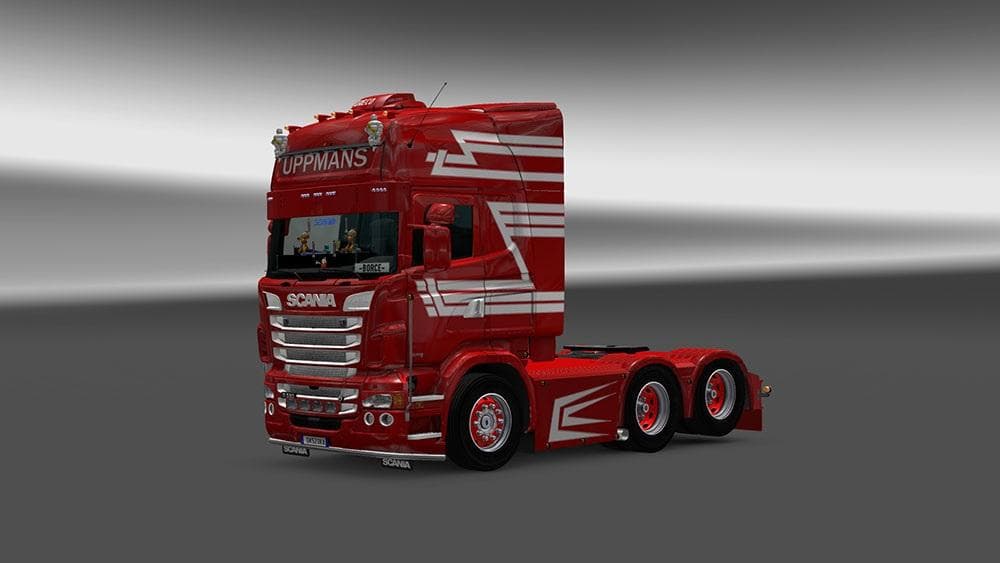
This skin mod for Scania RJL trucks is compatible with ETS2 versions 1.4, 1.20, 1.21, and 1.22. Created by Euro Truck Simulator 2, the file size and update deta
The SCANIA RJL UPPMANS SKIN is a repaint mod designed specifically for the Scania RJL truck model in Euro Truck Simulator 2. Rather than altering the truck's shape or mechanics, this type of mod changes the visual appearance by applying a custom skin that you select from the paint shop. It allows players to personalize their vehicle's look without affecting gameplay or performance.
Skin mods like this one are typically applied over the base truck model they were created for, so compatibility depends on having the correct version of the Scania RJL installed. This particular skin has been tested on versions 1.20 through 1.22 of ETS2, which covers several updates and ensures it works across a range of game releases. It won't interfere with other mods that change physics or add new trucks but should be loaded after any base vehicle mods to display correctly.
In a modded setup, skins fit neatly alongside other visual enhancements such as trailer skins or map expansions since they only affect textures on specific vehicles. If you run multiple skins, keep an eye on load order to make sure your preferred design shows up instead of being overwritten by another skin mod targeting the same truck model.
Truck enthusiasts who enjoy customizing their fleet visually would find this skin useful for adding variety without installing complex mods. It's especially relevant for those running a heavily modded game who want to maintain consistency with their favorite Scania trucks while refreshing their look.
Since the creator is unknown and file details are limited, users should back up their profiles before installation and verify compatibility with their current ETS2 version. Applying skins usually involves placing files in the mod folder and enabling them via the game’s mod manager, which is straightforward for anyone familiar with ETS2's modding system.
How to install
1. Download the .scs file. 2. Drop it into `Documents/Euro Truck Simulator 2/mod/`. 3. Enable in Mod Manager. 4. Apply the skin in the truck/trailer paint shop.
After the mod loads, save your game inside a safe area (parking lot or service) before deciding whether to keep it. If the game refuses to load with the mod enabled, check that all required DLCs are installed and that the supported ETS2 version chips on this page include your installed game patch.
Reviews
No ratings yetNo reviews yet — be the first to rate this mod.





