SCANIA RJL JENNSE GRENDOLPH SKIN
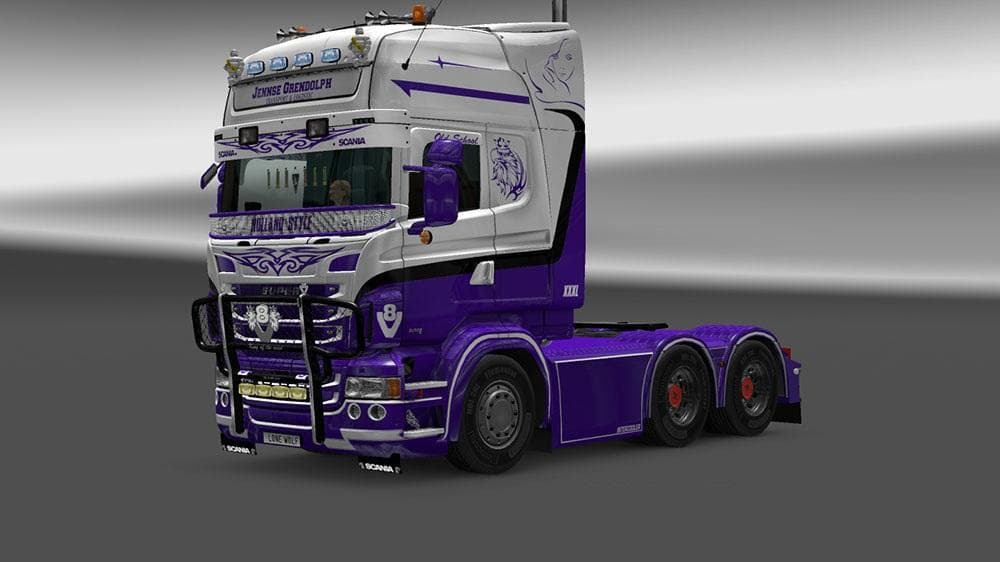
This mod is a skin for the Scania RJL truck, featuring the Jennse Grendolph design. Created by Euro Truck Simulator 2, the file size is 260 KB and credits go to
The SCANIA RJL JENNSE GRENDOLPH SKIN is a repaint mod designed for the Scania RJL truck in Euro Truck Simulator 2. Instead of altering the model or mechanics, this skin changes the visual appearance by applying a new design to the existing truck. These types of mods are installed through the paint shop within the game, allowing players to customize their vehicles without affecting performance or compatibility with other mods.
Skins like this one offer a straightforward way to personalize your trucks and fit them into your preferred aesthetic. Since they only modify textures, they're generally compatible with a wide range of other mods such as chassis or engine upgrades. It’s typical to load skins after any model-altering mods to ensure the repaint displays correctly on the intended vehicle variant.
In a modded setup, skins help diversify your fleet’s look without adding extra files that might conflict with gameplay mechanics. They don’t usually cause issues but should be matched to the exact truck model specified—in this case, the Scania RJL—to work properly. If you use multiple skins, managing their load order can help avoid overlapping graphics or selection problems in-game.
This kind of mod appeals mostly to players who enjoy customizing their trucks' appearance while sticking with familiar models. It suits those who want more variety beyond stock paint jobs without diving into complex modifications. Whether you’re running a themed convoy or just prefer a unique look for your Scania RJL, adding a skin like this is an easy upgrade.
While details about version compatibility and creator information aren’t provided here, skin mods usually remain functional across many ETS2 versions unless there are major updates to truck models or game assets. Keeping backups and checking for conflicts after installation remains good practice when adding any custom content.
How to install
1. Download the .scs file. 2. Drop it into `Documents/Euro Truck Simulator 2/mod/`. 3. Enable in Mod Manager. 4. Apply the skin in the truck/trailer paint shop.
After the mod loads, save your game inside a safe area (parking lot or service) before deciding whether to keep it. If the game refuses to load with the mod enabled, check that all required DLCs are installed and that the supported ETS2 version chips on this page include your installed game patch.
Reviews
No ratings yetNo reviews yet — be the first to rate this mod.





