SCANIA RJL BLUE TARDIS SKIN
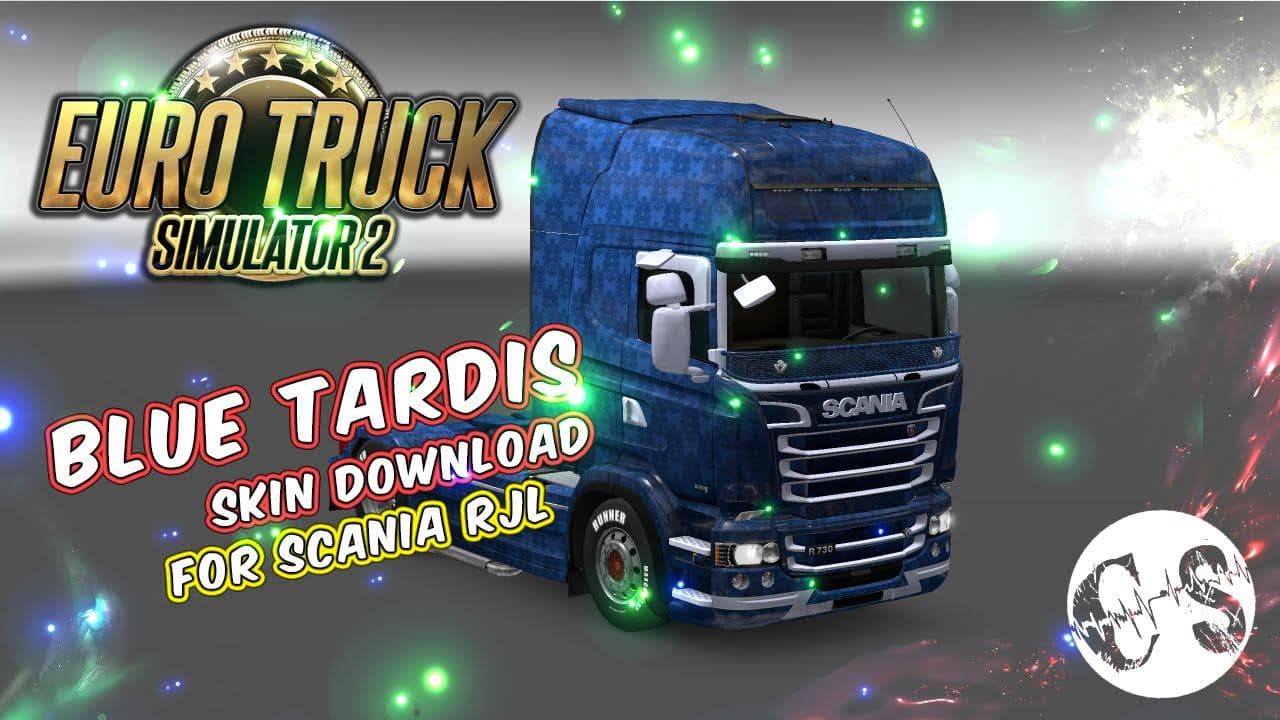
This mod is a Blue Tardis Skin for SCANIA RJL trucks in Euro Truck Simulator 2. To install, extract the archive into the mod folder and start the game.
The SCANIA RJL BLUE TARDIS SKIN is a paint job designed specifically for the Scania RJL truck model in Euro Truck Simulator 2. This skin changes the truck's appearance without altering its underlying model or performance, offering players a fresh look based on a blue-themed design inspired by the Tardis concept. It's applied through the in-game paint shop once installed, making it a straightforward way to customize your vehicle's aesthetics.
Skin mods like this one are popular for players who want to personalize their trucks beyond the default options provided by the game. Since they only affect the visual layer, they tend to have minimal impact on game performance and are generally easy to manage. You simply place the mod files into your ETS2 mod folder and activate it through the game’s mod manager.
When adding skins to a modded setup, it's good practice to keep track of load order, especially if you run multiple skins or other mods affecting trucks. Skins usually load well together because they don't modify game mechanics but conflicts can occur if two skins target the same truck model. In that case, only one skin will show up depending on which is loaded last.
This particular skin fits nicely into any collection aimed at personalizing your Scania fleet. If you're already running other Scania RJL enhancements or interior mods, this skin won't interfere since it doesn't change functionality—just looks. It’s an easy way to refresh your truck's appearance without risking compatibility issues with gameplay mods.
Players who enjoy thematic or pop culture-inspired designs might find this blue Tardis-themed repaint appealing. It adds some character and uniqueness when driving across European roads in ETS2, especially if you like standing out with custom visuals rather than sticking with stock colors.
How to install
1. Download the .scs file. 2. Drop it into `Documents/Euro Truck Simulator 2/mod/`. 3. Enable in Mod Manager. 4. Apply the skin in the truck/trailer paint shop.
After the mod loads, save your game inside a safe area (parking lot or service) before deciding whether to keep it. If the game refuses to load with the mod enabled, check that all required DLCs are installed and that the supported ETS2 version chips on this page include your installed game patch.
Reviews
No ratings yetNo reviews yet — be the first to rate this mod.





