SCANIA RJL ADVIN STAM REWORKED SKIN
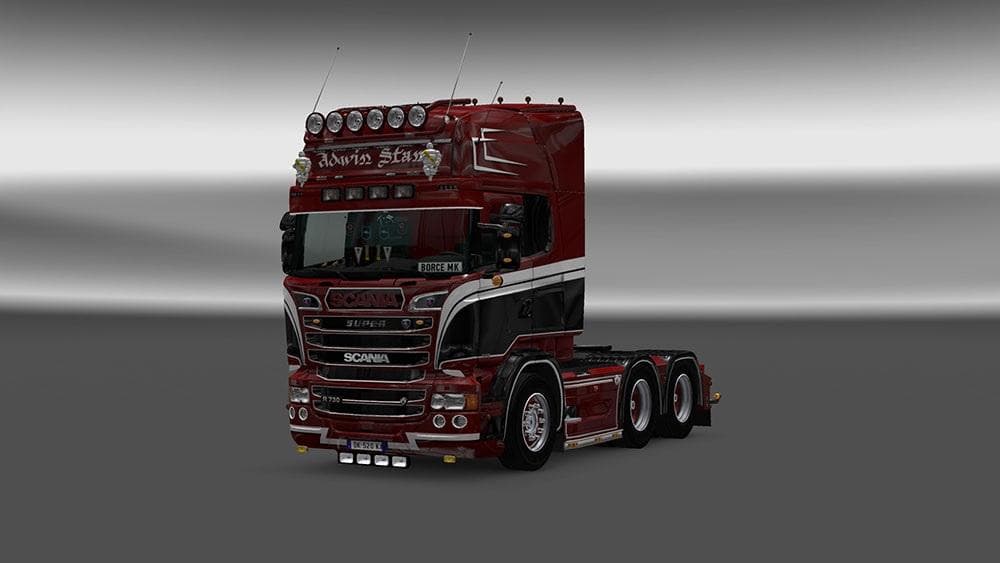
SCANIA RJL ADVIN STAM REWORKED SKIN is a skin mod for Scania RJL trucks in ETS2. It is compatible with game versions 1.4, 1.18, 1.19, 1.20, and 1.21. The creato
The SCANIA RJL ADVIN STAM REWORKED SKIN is a repaint mod designed for the Scania RJL truck model in Euro Truck Simulator 2. This type of skin mod doesn't alter the truck's shape or performance but changes its exterior appearance by applying a new paint design through the in-game paint shop. It's compatible with several ETS2 versions, including 1.4, 1.18, 1.19, 1.20, and 1.21, ensuring a wide range of players can use it without compatibility issues related to game updates.
Skin mods like this one fit easily into a modded setup since they simply override the default look of the vehicle they target. They usually require the base truck model to be installed first—in this case, the Scania RJL—and are typically loaded after any gameplay or map mods to avoid conflicts. It's good practice to place skin mods towards the end of your load order so their textures appear correctly over other modifications.
Players interested in customizing their trucks visually without changing handling or adding new parts would find this mod useful. It lets you personalize your Scania RJL with a fresh look that can complement other visual enhancements like cabin accessories or trailer skins. Since it’s a reworked skin, it may appeal especially to those who want something different from the standard factory paint jobs.
Because no creator details or specific file size are mentioned, it's wise to check mod descriptions carefully and back up your profiles before installing new skins. Also, remember that while skins don't affect gameplay mechanics directly, loading many high-resolution skins simultaneously can impact performance depending on your system.
Overall, if you’re running a setup featuring the Scania RJL and want an alternative paint style that integrates well with existing mods and supported ETS2 versions, this reworked skin offers a straightforward way to refresh your truck’s appearance.
How to install
1. Download the .scs file. 2. Drop it into `Documents/Euro Truck Simulator 2/mod/`. 3. Enable in Mod Manager. 4. Apply the skin in the truck/trailer paint shop.
After the mod loads, save your game inside a safe area (parking lot or service) before deciding whether to keep it. If the game refuses to load with the mod enabled, check that all required DLCs are installed and that the supported ETS2 version chips on this page include your installed game patch.
Reviews
No ratings yetNo reviews yet — be the first to rate this mod.





