SCANIA RJL 1.4 F1 LEGENDS AIRBRUSH SKIN
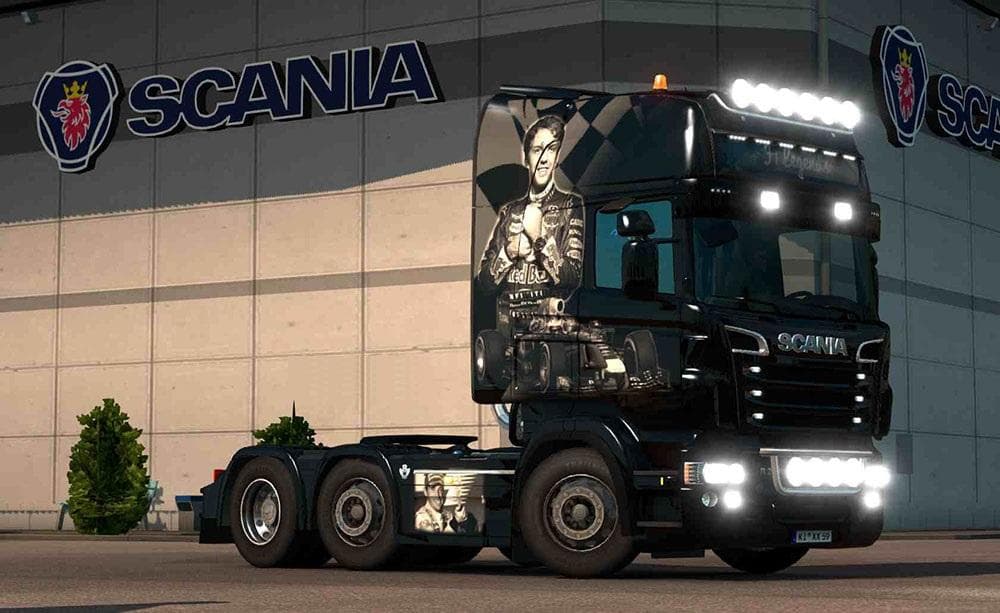
The SCANIA RJL 1.4 F1 LEGENDS AIRBRUSH SKIN is a paint job mod designed specifically for the RJL Scania truck model in Euro Truck Simulator 2. It applies an airbrushed Formula 1 legends theme to the existing truck, changing its appearance without altering the underlying model or performance. Since it's a skin mod, installation involves placing the files in your mod folder and activating it through the game's mod manager.
Skin mods like this one are popular among players who want to personalize their trucks with unique designs and themes. They don't add new vehicles but repaint existing ones, meaning they rely on having the compatible base truck installed—in this case, the RJL Scania version 1.4. This skin has been tested on ETS2 version 1.4, ensuring compatibility within that range.
Because it’s a cosmetic modification, it fits well into any modded setup that includes the RJL Scania truck model. Players often run multiple skins alongside other mods like map expansions or tuning packs without conflicts. Load order usually doesn't pose significant issues for skins unless there are several trying to modify the same truck simultaneously; in such cases, only one skin will show up.
This particular skin unlocks SCS’s default company name area, allowing users to customize that detail further by adding their own branding or text if they wish. This small feature adds flexibility for those who enjoy tweaking every visual element of their trucks.
Those interested in motorsport history or fans of Formula 1 might find this skin appealing since it brings a racing-themed look to their virtual rig. It’s a straightforward way to refresh your game’s visuals and show off some personality behind the wheel.
Overall, if you already have the RJL Scania model and enjoy customizing your fleet's look with thematic paint jobs, this F1 Legends airbrush skin is worth trying out for ETS2 version 1.4.
How to install
1. Download the .scs file. 2. Drop it into `Documents/Euro Truck Simulator 2/mod/`. 3. Enable in Mod Manager. 4. Apply the skin in the truck/trailer paint shop.
After the mod loads, save your game inside a safe area (parking lot or service) before deciding whether to keep it. If the game refuses to load with the mod enabled, check that all required DLCs are installed and that the supported ETS2 version chips on this page include your installed game patch.
Reviews
No ratings yetNo reviews yet — be the first to rate this mod.





