SCANIA R & STREAMLINE (RJL) MICHELIN COMBO SKIN PACK
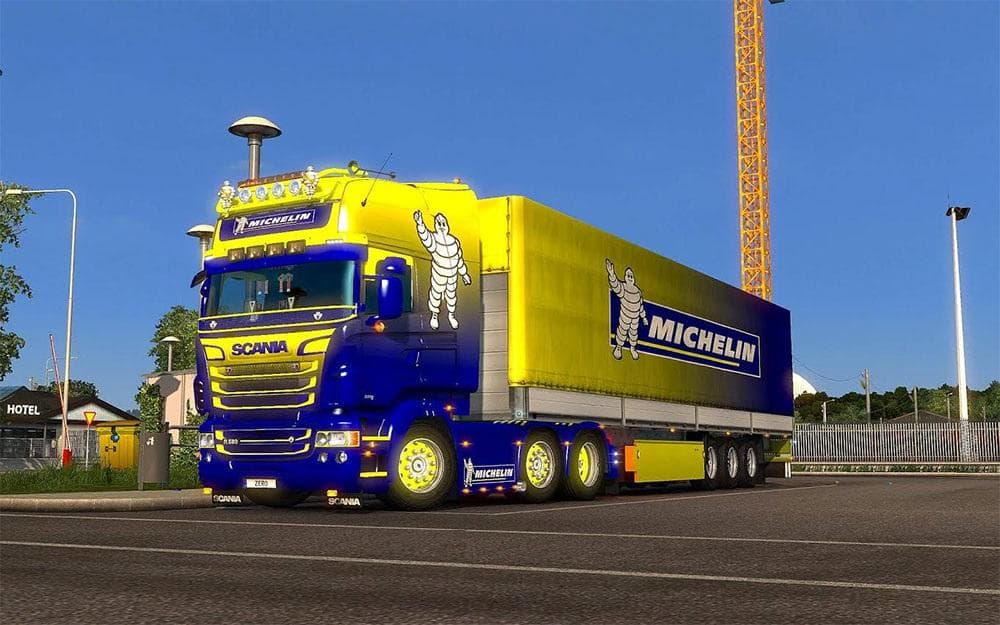
This skin pack for Scania R & Streamline (RJL) features a MICHELIN combo design, tested on ETS2 version 1.21. Created by Euro Truck Simulator 2, the file size i
The SCANIA R & STREAMLINE (RJL) MICHELIN COMBO SKIN PACK provides a fresh look for your Scania trucks by applying a custom paint job inspired by the Michelin brand. This type of mod doesn't alter the truck's structure but repaints the existing model, giving it a distinct appearance without changing gameplay mechanics. Skins like this are applied directly in the paint shop, so they rely on owning the compatible base vehicle within ETS2.
Skin mods such as this one are straightforward additions to a modded setup since they mainly affect visual aspects. They generally don’t conflict with gameplay or physics mods, but it's wise to load skins after any truck model modifications to ensure the repaint displays correctly. Since this pack is designed for ETS2 version 1.21, compatibility with other mods may depend on whether those mods support the same game version.
This pack specifically targets Scania R and Streamline models, making it suitable for players who enjoy using these trucks and want to customize them with branded liveries. Fans of realistic trucking experiences often seek out skin packs that replicate real-world companies or themes, and this combo fits right into that niche.
Because it’s focused on aesthetics, adding this skin pack won’t impact your game’s performance significantly or require additional configurations beyond selecting the skin at a garage. It complements other mods that change trucks or trailers without causing conflicts, provided you manage your mod load order properly.
Players who prefer a personalized fleet or want to showcase their affinity for certain brands will find this mod useful. It enhances immersion by introducing licensed-style designs while keeping things simple and easy to integrate into existing mod collections.
How to install
1. Download the .scs file. 2. Drop it into `Documents/Euro Truck Simulator 2/mod/`. 3. Enable in Mod Manager. 4. Apply the skin in the truck/trailer paint shop.
After the mod loads, save your game inside a safe area (parking lot or service) before deciding whether to keep it. If the game refuses to load with the mod enabled, check that all required DLCs are installed and that the supported ETS2 version chips on this page include your installed game patch.
Reviews
No ratings yetNo reviews yet — be the first to rate this mod.





