SCANIA R NORMAL JOKER TEMALI SKIN
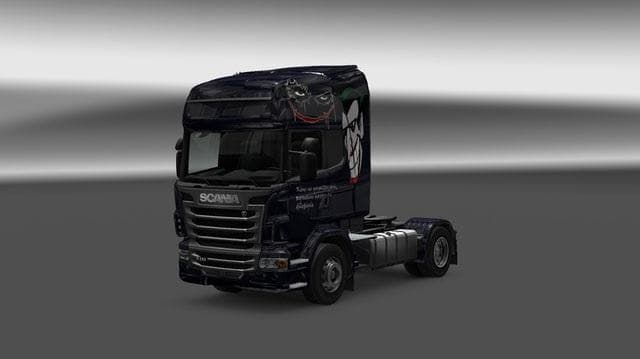
This mod is a Joker-themed skin for the Scania R truck in ETS2 version 1.21. Created by Euro Truck Simulator 2, the file size is 5.4 MB and the creator is credi
The SCANIA R NORMAL JOKER TEMALI SKIN offers a fresh look for the Scania R truck in Euro Truck Simulator 2. This mod changes the truck's exterior design with a Joker-themed paint job, giving your vehicle a distinctive appearance without altering the base model. It works by applying a new skin through the in-game paint shop, which means it's dependent on having the Scania R as your base truck.
Skin mods like this one don't affect gameplay mechanics or truck performance. Instead, they focus solely on visual customization, allowing players to personalize their rides. Since it’s designed for ETS2 version 1.21, compatibility with this and nearby versions is expected but always check your game version before installing.
In a modded setup, skins are usually loaded after any mods that alter truck models or add new trucks. This ensures that the skin correctly applies to the intended vehicle without conflicts. Because skins repaint existing trucks rather than changing their structure, they generally coexist well with other mods unless another skin targets the same model and slot.
This Joker-themed skin fits well for players who enjoy adding personality to their fleet with thematic designs rather than generic colors or logos. It's especially suited for those running mod collections centered around Scania trucks or who want a unique aesthetic touch reflecting popular culture themes.
Installation typically involves placing the mod file into your ETS2 mod folder and activating it in the game's Mod Manager. If you’re already using multiple skin mods, just keep an eye on load order so this one applies correctly over others targeting the Scania R.
How to install
1. Download the .scs file. 2. Drop it into `Documents/Euro Truck Simulator 2/mod/`. 3. Enable in Mod Manager. 4. Apply the skin in the truck/trailer paint shop.
After the mod loads, save your game inside a safe area (parking lot or service) before deciding whether to keep it. If the game refuses to load with the mod enabled, check that all required DLCs are installed and that the supported ETS2 version chips on this page include your installed game patch.
Reviews
No ratings yetNo reviews yet — be the first to rate this mod.





