SCANIA R DARK TRANS SKIN
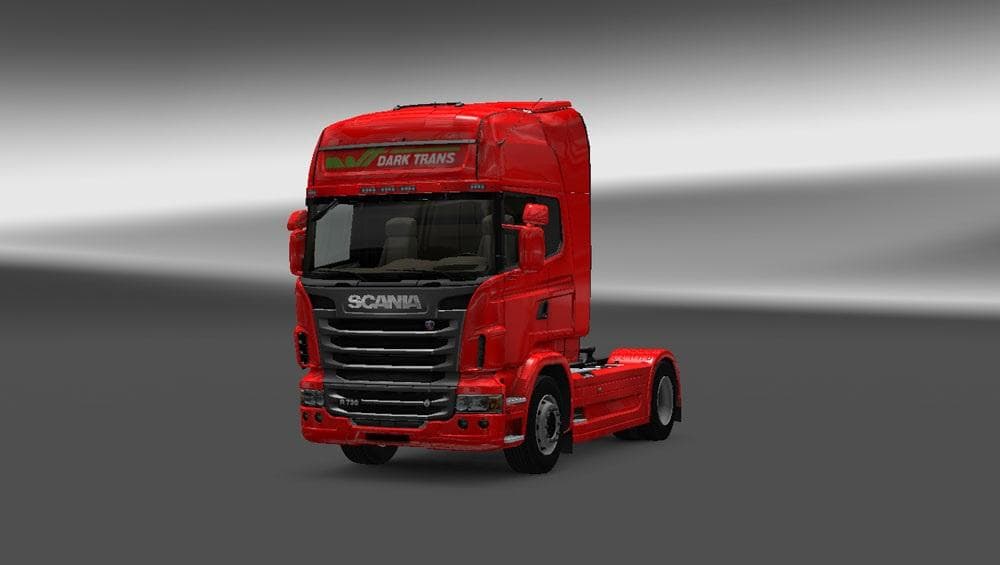
The SCANIA R DARK TRANS SKIN is a repaint mod designed specifically for the Scania R truck model in Euro Truck Simulator 2. It offers a darker, more subdued color scheme that changes the truck's exterior without altering its structure or performance. This type of skin mod works by applying new textures to an existing vehicle, so you can find it directly in the paint shop once installed and active in your mod list.
Skin mods like this one are straightforward to use and popular among players who want to customize their trucks without adding extra weight or affecting game mechanics. They simply swap out the original paint job for something different, which means they’re compatible with most other mods as long as those don’t modify the same texture files. Since this mod supports ETS2 version 1.19, it fits well into setups running that or nearby versions.
When incorporating skin mods into a larger modded setup, it's wise to keep load order in mind. Skins should generally be loaded after any mods that alter the base truck model itself but before map or gameplay tweaks. This helps prevent conflicts or unintended overrides. Because skins only affect visuals, they usually have fewer compatibility issues compared to more complex mods.
Players who enjoy customizing their fleet’s look will appreciate a dark-themed option like this one for their Scania R trucks. It suits drivers aiming for a more understated or professional appearance on European roads such as Germany, France, or Spain, where the game’s environment often highlights vehicle aesthetics.
This particular skin doesn’t come with known extras like logos or decals beyond the base design, keeping things simple and clean. It’s ideal for anyone wanting to refresh their Scania R’s appearance without much fuss or added content complexity.
How to install
1. Download the .scs file. 2. Drop it into `Documents/Euro Truck Simulator 2/mod/`. 3. Enable in Mod Manager. 4. Apply the skin in the truck/trailer paint shop.
After the mod loads, save your game inside a safe area (parking lot or service) before deciding whether to keep it. If the game refuses to load with the mod enabled, check that all required DLCs are installed and that the supported ETS2 version chips on this page include your installed game patch.
Reviews
No ratings yetNo reviews yet — be the first to rate this mod.





