SCANIA BLACK & WHITE INTERIOR WITH CARBON
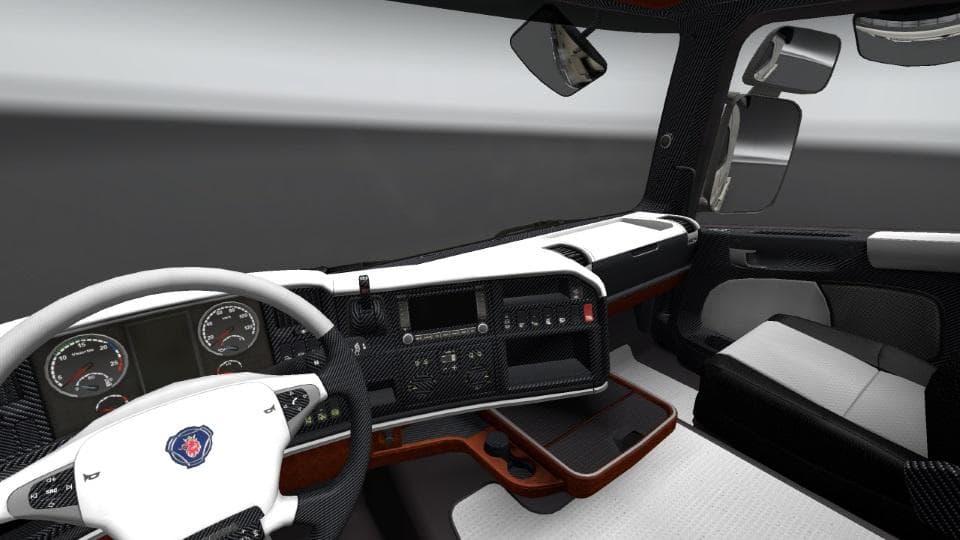
SCANIA BLACK & WHITE INTERIOR WITH CARBON is an ETS2 interior. Listed compatible with ETS2 1.21.
The SCANIA BLACK & WHITE INTERIOR WITH CARBON mod changes the inside look of Scania trucks, offering a monochrome theme enhanced with carbon fiber elements. It alters the vehicle's cabin design to give a more refined and sporty feel compared to the stock interiors. This type of mod typically replaces textures and materials within the truck's cockpit, allowing players to personalize their driving experience without affecting gameplay mechanics.
Mods like this one are installed through the in-game Mod Manager and work by overriding default cabin visuals. Since it’s categorized as 'other,' it doesn’t add new trucks or external parts but focuses solely on aesthetic improvements inside the cab. These modifications are popular among players who want a fresh take on their truck interiors while keeping everything else standard.
In terms of compatibility, interior mods generally play well alongside most other types of mods such as skins or map expansions, provided they don’t modify the same files. The usual advice applies: keep an eye on load order when running multiple cabin or texture mods to avoid conflicts or visual glitches. Testing in version 1.21 means it should be stable for that ETS2 release but always back up your files before installing.
This mod suits drivers who appreciate subtle customization and enjoy tweaking details that might otherwise be overlooked during long hauls across Europe. If you like your truck cabin to feel a bit sportier yet understated, this black and white interior with carbon touches fits right into a modded setup aiming for style without overhauls.
Overall, it's a straightforward way to refresh the look inside your Scania trucks without adding complexity. For those who run a collection of visual mods or want something different from standard cabins, it’s worth trying out.
How to install
1. Download the file(s) from the original source linked above. 2. Drop them into `Documents/Euro Truck Simulator 2/mod/`. 3. Enable in Mod Manager and restart the game.
After the mod loads, save your game inside a safe area (parking lot or service) before deciding whether to keep it. If the game refuses to load with the mod enabled, check that all required DLCs are installed and that the supported ETS2 version chips on this page include your installed game patch.
Reviews
No ratings yetNo reviews yet — be the first to rate this mod.





