SCANIA 143M V3.5
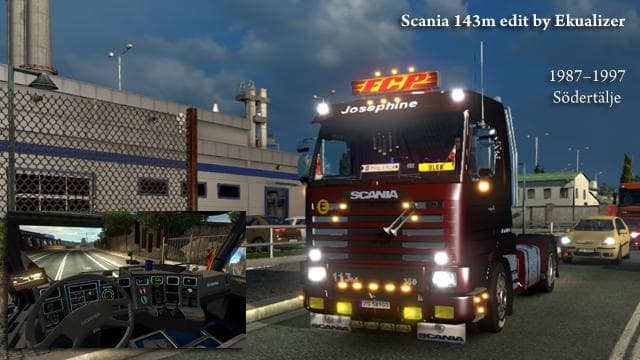
The SCANIA 143M mod for ETS2 offers V8 engine sound enhancements for specific engine models. Created by Euro Truck Simulator 2, this mod includes separate sound
The SCANIA 143M V3.5 mod focuses on enhancing the sound profile of Scania trucks in Euro Truck Simulator 2 by providing distinctive engine sounds for various V8 and R6 engines. This type of mod replaces the default audio files with more specific, often deeper or more authentic engine noises, aiming to enrich the driving experience through sound alone. It covers multiple engine variants such as the DSC 14.06 400 v8 and DSC 11.13 360 r6, giving players a choice in how their truck sounds based on engine type.
Sound mods like this one typically need to be loaded higher in the mod order to ensure they override the base game’s or truck-specific sounds properly. They generally work well alongside truck skin mods and other visual enhancements without causing conflicts, as long as those mods do not alter the same sound files. It’s wise to keep an eye on compatibility if you run several sound packs simultaneously, since overlapping files might lead to unpredictable audio behavior.
This mod fits nicely into any setup where realism or auditory immersion is valued. Players who enjoy tuning their trucks both visually and sonically will find it adds a layer of depth to their virtual driving sessions. The inclusion of multiple engine sounds allows for customization that matches different gameplay styles or preferences for certain Scania models.
Anyone who spends long hours behind the wheel in ETS2 and appreciates detailed audio feedback from their truck will likely want to try this out. It can make familiar routes feel fresh by changing how your rig responds audibly when accelerating, cruising, or idling. Fans of Scania trucks specifically will recognize the character brought by these distinct engine sounds.
While exact compatibility details are unknown, mods like SCANIA 143M V3.5 usually integrate smoothly with map mods across regions such as Germany, Poland, or Sweden since they don’t alter environmental audio directly but focus solely on vehicle sound effects.
How to install
1. Download the .scs file. 2. Drop it into `Documents/Euro Truck Simulator 2/mod/`. 3. Enable in Mod Manager. Sound mods usually need to load **above** truck mods in load order. 4. Restart the game so the audio engine picks up new samples.
After the mod loads, save your game inside a safe area (parking lot or service) before deciding whether to keep it. If the game refuses to load with the mod enabled, check that all required DLCs are installed and that the supported ETS2 version chips on this page include your installed game patch.
Reviews
No ratings yetNo reviews yet — be the first to rate this mod.





