SCANIA 111-141 SKIN PACK 1.22
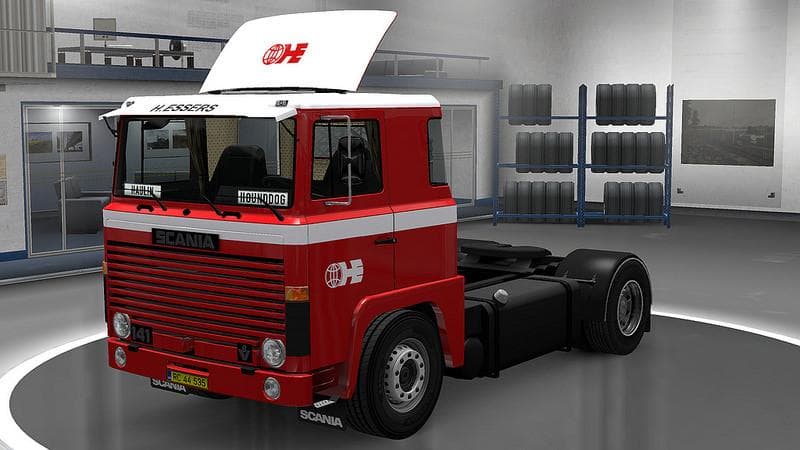
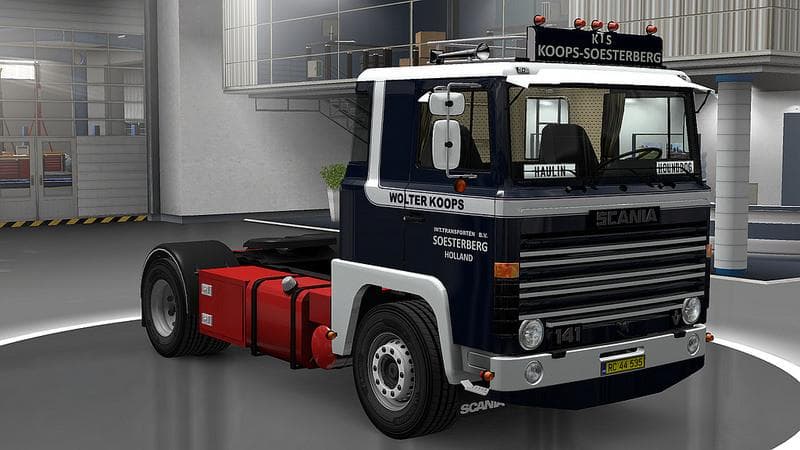
The SCANIA 111-141 SKIN PACK 1.22 is a skins mod for Euro Truck Simulator 2, featuring various designs for Scania trucks including Wolter Koops, H.Essers, and M
The SCANIA 111-141 SKIN PACK 1.22 offers a collection of custom paint jobs designed specifically for the Scania 111 and 141 trucks in Euro Truck Simulator 2 version 1.22. This mod doesn't alter the truck models themselves but provides fresh visual styles that can be applied directly through the game's paint shop. It includes various liveries representing different companies, giving these classic Scanias a more personalized appearance on the road.
Skin mods like this one are popular because they allow players to change the look of their vehicles without touching any gameplay mechanics or truck handling. They simply repaint existing trucks, trailers, or cabins to add variety and character to your fleet. Since this pack targets Scania 111 and 141 models, it requires owning those base vehicles in ETS2 to work properly.
When using skin packs, it's important to place them correctly in your mod manager load order. Generally, skins should be loaded after any truck model mods but before map or gameplay mods. This helps avoid conflicts and ensures that your chosen paint job displays correctly in-game. Because this pack is made for version 1.22, compatibility with other mods designed for the same game version tends to be straightforward.
Players who appreciate classic Scania trucks and want a fresh look without switching to newer models will find this skin pack useful. It fits well into a modded setup focused on historical or vintage trucking themes and adds visual diversity during long hauls across European roads.
Overall, if you enjoy customizing your Scania fleet with authentic company liveries and want options tailored to older truck versions, this skin pack fits neatly into that niche. It's a simple way to refresh your driving experience by changing how your trucks appear while keeping everything else familiar.
How to install
1. Download the .scs file. 2. Drop it into `Documents/Euro Truck Simulator 2/mod/`. 3. Enable in Mod Manager. 4. Apply the skin in the truck/trailer paint shop.
After the mod loads, save your game inside a safe area (parking lot or service) before deciding whether to keep it. If the game refuses to load with the mod enabled, check that all required DLCs are installed and that the supported ETS2 version chips on this page include your installed game patch.
Reviews
No ratings yetNo reviews yet — be the first to rate this mod.





